
Workday Integrations Overview
Overview
This chapter details how integration systems interact with Workday and external systems. It describes the different integration tools and their data sources and components.
Objectives
By the end of this chapter, you will be able to:
- Explore how integrations fit into the Workday architecture.
- Define and discuss the different types of web services.
- Define the Workday web service APIs as they relate to integration systems.
- Compare the Workday integration tools.
- Identify the data sources available for each Workday Integration tool.
- Choose the best tool for an integration system.
Integration Systems
An integration transfers data between Workday and an external system. The integration system provides the methodology for communicating data.
Two-Way Data Flow
Workday integrations support two-way data exchange between Workday and an external endpoint.
For outbound integrations:
- Workday provides the data.
- You can perform transformations on the outgoing data.
- For example, you can retrieve employee, payroll, or budget data from Workday, process the data, and deliver the data to an external system, like a third-party payroll provider.
For inbound integrations:
- You import data into Workday.
- For example, you can retrieve employee, payroll, or budget data from an external system, process the data, and import the data into Workday.
Integrations Features
Workday integrations can:
- Export and import large volumes of data.
- Run using parameters that allow for full data extracts or filter the data you want to extract. Additionally, some integrations allow you to retrieve only the data that has changed since the last extraction.
- Obtain their data from web service calls, or from custom report data. Some integration tools allow you to build an integration without needing direct knowledge of web service requests or responses.
- Run on a schedule or on an ad hoc basis.
- Encrypt the data.
- Deliver data using various methods like:
- Creating a file attachment.
- Using an SFTP server.
- Having the external source make a direct web service call.
- Complete most tasks, in bulk, that you can perform in the Workday User Interface (UI).
Workday stores all customer data as objects. Web service requests are the primary way to access Workday object data. Web services are one of the central components of the Workday architecture and enable other applications to integrate with Workday, and vice versa.
Web Services Defined
A web service is a standardized method for processing messages between client and server applications.
Note
: The World Wide Web Consortium, or W3C defines web service specifications. Check out www.w3.org to find the latest specifications.A web service carries out a specific set of operations (or functions). You can find and invoke these operations over the network. In a web service transaction, a user or system sends a request. A server processes the request and sends back a response.
Web services use standardized protocols like HTTP or HTTPS to exchange data. Typically, the request-response exchange uses XML (Extensible Markup Language), but other formats have become available as web service specifications have matured.
Types of Web Services
There are two common standards for web services:
- Simple Object Access Protocol (SOAP)Think of SOAP messages as an envelope. The envelope contains two sections - a header and a body. Routing information directing the message to a specific client is contained in the header. The actual data is in the body. You create SOAP messages with XML. You can send SOAP messages using HTTP(S).WSDL (Web Services Description Language)A WSDL file is another XML-based file that documents what the SOAP web service can do. The client application reads the WSDL in order to know the location of the service as well as get an understanding of how to use the web service.
- Representational State Transfer (REST)REST is a newer web service standard compared to SOAP. With the REST standard:
- There is a clearer separation between the client and the server. You can implement both sides without either side knowing about the other. They only need to know the format of the messages.
- REST web services are stateless. The server has no knowledge of the client's state and vice versa. The statelessness of REST allows messages to be processed in any order. REST enforces statelessness by using resources instead of commands.
REST uses HTTP verbs for a request to interact with a resource. These verbs represent the CRUD paradigm - Create, Read, Update, and Delete. The most common verbs are:- GET (Read)
- POST (Create)
- PUT (Update)
- DELETE (Delete)
Note
: Other REST verbs are available. The W3C controls the specifications for REST, where you can learn about the remaining verbs and their usage.Workday APIs
An Application Programming Interface (API) is a set of functions and procedures that allow internet applications to interact. A web service is one type of API.
There are four APIs you can use to access Workday data via an integration system.
- Workday Web Services (WWS) Simple Object Access Protocol (SOAP)
- Workday Representational State Transfer (REST)
- Report as a Service (RaaS)
- Workday Query Language (WQL)
The WWS SOAP API allows you to access data using XML.
Resource
: Search for the Workday Web Services Directory
on Workday Community for a list of SOAP API operations.Use the Workday REST API to quickly return a small set of frequently used data, like self-service mobile applications, custom objects, and authentication. Use XML or JSON to access REST web service operations.
Resource
: Search for the REST API Reference
on Workday Community.In Workday, you create reports with an easy-to-use interface. To use a report in an outbound integration system, enable it as a web service through the report's advanced settings. A web-service-enabled custom report is also referred to as a Report-as-a-Service, or RaaS.
While not applicable in this class, WQL gives you a similar experience to SQL that is simple, better performing, and could eliminate the need to write some XSLT. WQL also eliminates the overhead of creating a custom report. And, you can also easily port WQL statements between tenants, like between an Implementation tenant and a Sandbox tenant.
Integration Tools
To build an integration system, you use an integration tool. Workday offers the following integration tools.
Workday Integration Tools
Integration Tool | Description | Features |
|---|---|---|
Cloud Connect (Connectors) | Integration systems that are used for simple inbound data loads and outbound extracts. Have both vendor-specific (end-to-end) connectors and generic connectors. | Integration services, change detection, work with business processes, integration maps, integration attributes, integration field overrides. |
Orchestrate | Web-based tool for creating and customizing integrations without code. | Orchestration Builder, custom transformations, batch integrations, interact with Workday and third-party endpoints. |
Document Transformation | Advanced transformation tool with basic error message functionality. Only used with connectors. | Error handling, business process, multiple files. |
Workday Studio | Eclipse-based development environment for the most customizable integration systems. | Integration maps, attributes, field overrides, error handling, multiple files, multiple web service calls, multiple transformations. |
Note
: End-to-End connectors integrate with specific external endpoints, like Aetna. Generic connectors, like Core Connector: Worker, provide a generic foundation to a specific dataset that you can customize. For a list of connectors, run the Integration Template Catalog report in Workday.Note
: Connectors eliminate the need to directly use SOAP web services. With connectors, you will not have to go through the complexity of writing web service requests. The connector will make the request and the SOAP calls on your behalf. You would only need to make SOAP or REST calls if you are using Workday Studio.Data Sources Available per Tool
Each Workday integration tool relies on a data source. Inbound integrations insert external data using Workday SOAP or REST web services. Outbound integrations can use any of the data source types to output Workday data, but it varies by tool, as shown in the following table:
Integration Tool | Data Source |
|---|---|
Connector | Relies on underlying SOAP web services. The user does not select a web service operation or write a web service request. |
Connector with Document Transformation | Uses the same source as its connector because it does not extract the data, it only transforms the data. |
O
rchestrate | Uses RaaS, SOAP, or REST. The user can make calls to Workday and third-party endpoints. |
Workday Studio | Uses RaaS, WQL, SOAP, or REST. |
Reminder
: A custom report enabled as a web service, a.k.a. RaaS, does not require a user to select a web service operation or write a request.Choosing a Tool for an Inbound Integration System
Choose the right tool when building an integration system. When creating inbound integrations, consider these tools in the following order:
Inbound Integration Tool | Use If |
|---|---|
End-to-End Connector |
|
Generic Connector |
|
Orchestrate |
|
Connector with Document Transformation |
|
Workday Studio |
|
Choosing a Tool for an Outbound Integration System
When creating outbound integrations, consider these tools in the following order:
Outbound Integration Tool | Use If |
|---|---|
End-to-End Connector |
|
Generic Connector |
|
Orchestrate |
|
Connector with Document Transformation |
|
Workday Studio |
|
Resource
: Explore Workday Documentation for additional details about each integration tool. Search Reference: Setup Considerations - Integrations.Workday Architecture Related to Integrations
When people think of Workday, they usually think in terms of the UI. Workday provides a group of pages used to serve data and process transactions for our mobile and browser-based users.
Workday stores customer data as in-memory objects. Originally, a suite of business services called the Object Management Server (OMS) maintained the relationships and integrity of these objects. Over time, the OMS has evolved to become a set of microservices that scale based on transaction and reporting demand.
Integrations typically access Workday object data via web service requests. The use of web services is an important aspect of how Workday addresses issues such as security and performance. All communication with the Workday services is via HTTPS requests.
Note
: If your integration uses Data Initialization Service (DIS), data retrieval does not use web service requests, and is typically faster than calling SOAP, REST, or RaaS.Users generally access Workday through web browsers. The User Interface Services (UI Server) handles user requests, presenting HTML forms for interaction, while communicating with the Workday application using XML messages. Developers also connect via the UI Server to use browser-based tools. For example, they might do so when building or configuring certain types of integrations.
The following is a high-level visual of the overall Workday architecture:
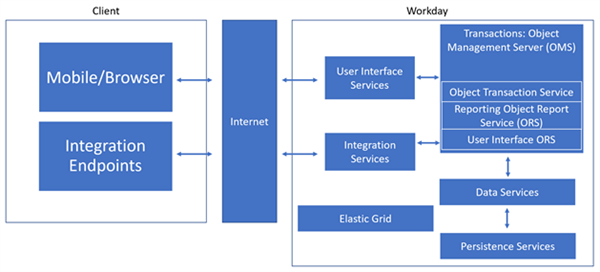
However, there is another important aspect of Workday: the integration services. Several Enterprise Service Brokers (ESBs) make up the integration services. The list of ESBs includes:
- ESBg (Gateway)
- Handles SOAP/REST web service traffic.
- Handles transfers via HTTP, HTTPS, FTP, SFTP, FTPS, and email.
- ESBb (Blobitory), which processes and stores reports and attachments.
- ESBi, which handles packaged integrations like Payroll, Benefits, SalesForce, and others.
- ESBc (Cloud), which services Workday Studio and customer written integrations.
Both the user interface services and integration services communicate with the Object Management System (OMS). Business data stored in the persistence layer gets loaded into the OMS memory in an optimized form. The OMS handles:
- Data encryption
- Data persistence
- Security
- Auditing
The OMS includes the following subservices:
- Object Transaction Service (OTS)
- Primary workhorse of the transactional system
- Contains tenant business data
- Performs Read and Update transactions
- Two Object Reporting Services (ORS)
- One ORS for the UI that:
- Allows offloading fast UI-based traffic.
- Workday uses for customers with high numbers of users.
- One ORS for reporting
- Offloads long-running, memory-intensive reports from the OTS.
- Processes all background and scheduled reports.
- Processes read tasks and Reports as a Service (RaaS) from integrations or direct web service calls.
- Application Object Database (AOD)
- Responsible for synchronizing OTS, ORS, and the database.
- Handles Indexing and Search.
Note
: Workday Integrations frequently use reports and RaaS.Lastly, there is the Elastic (Compute) Grid. Workday created the Elastic Compute Grid to fundamentally change the volume of batch processing that we can quickly and efficiently perform in the cloud. The Elastic Compute Grid contains many nodes that process units of work simultaneously. Workday automatically allocates and deallocates nodes as needed. The Elastic Grid includes multiple pools:
- Payroll grid pool for large payroll customers.
- Multiple integration pools to handle the different types of integrations.
- PDF print pool.