ARRAYAREA
Description
Returns the containing range of the array formula, based on the single cell address that you specify. The array can originate either in a Workday report or an array formula. This function helps you create formulas that operate on arrays where the cell range is unknown or changes over time.
Syntax
ARRAYAREA(
ref_cell
) - ref_cell: The cell reference. The cell must be the anchor cell of the array formula area. Make sure you enter only a single cell address and not a range.
Example
The ARRAYAREA formula is dependent on the
ref_cell
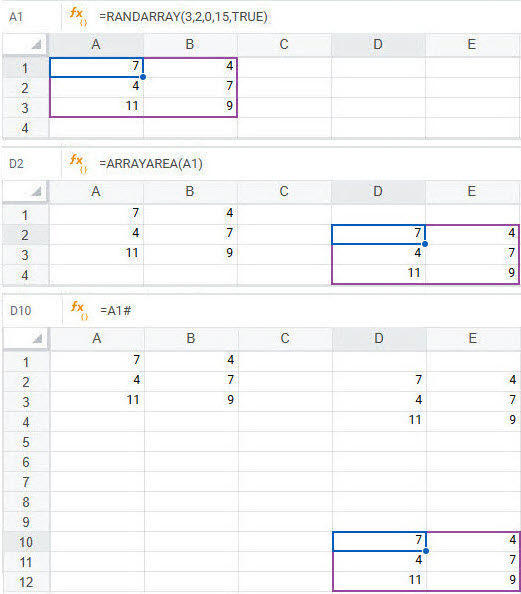
being the anchor cell of the array formula area.In this example, A1 contains the formula =RANDARRAY(3,2,0,15,TRUE) and A1:B3 is the array formula result set.
To return the results of the RANDARRAY formula, you can use the ARRAYAREA formula and reference A1, as in =ARRAYAREA(A1).
You can also get the same results as =ARRAYAREA(A1) by simply using the cell reference A1 with #, as in =A1#.