
Concept: Workday Agent Gateway
You can use Workday's Agent Gateway to connect your AI agents with Workday's Agent System of Record (ASOR) more easily. It enables your agents to collaborate and communicate information with Workday, providing real-time support and automation within your existing workflow.
Agent Gateway provides a single, unified regional endpoint to centralize and streamline how third-party agents interact with Workday. Agent Gateway provides access to the Workday APIs, including Graph, for all agentic partners, along with access to the Agent Definition Registry API. .
The Agent Gateway includes:
- Workday Graph API
- Workday Query Language (WQL)
- Workday RaaS
- Agent Gateway enables you to:
- Use your agent to work efficiently with future Workday platform updates and security protocols.
- Ensure your agent interacts with Workday in a stable, high-performance environment through built-in rate limiting and performance guardrails.
- Ensure all API calls are authenticated and authorized through Workday's security layer.
- Use a single entry point for all your agent's Workday API interactions.
- Clearly track your agent's API consumption for accurate billing and cost management.
API Requests Through Agent Gateway
All third-party agents interacting with Workday APIs must route their API traffic through Agent Gateway using Agent System User (ASU) security. For more information, see Concept: Agent Security.
API Requests through Agent Gateway
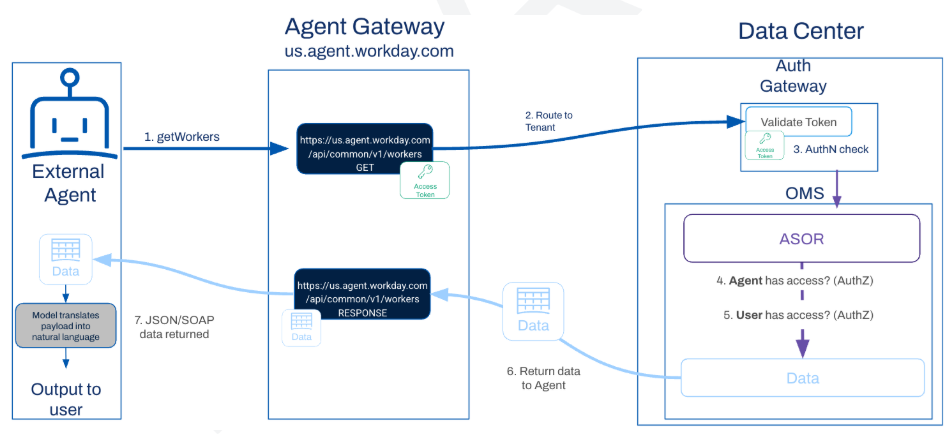
To route your API traffic through Agent Gateway, you must register your external agents in Workday through Agent System of Record (ASOR) and configure authentication. See Configure External Agents in Workday.
API Call Requirements
Your agent's API calls must include:
- Gateway Endpoint: us.agent.workday.com. Substitute endpoints based on your region.
- Tenant Alias HTTP header: Provide wd-agent-tenant-alias as an HTTP header in the request. The value must be unique.
- SOAP calls: The correct endpoint for SOAP calls ishttps://us.agent.workday.com/soap/{version}/{serviceName}Substitute endpoints based on your region.
Sample API request for US region:
GET https://us.agent.workday.com/api/common/v1/workers
Sample HTTP Header:
wd-agent-tenant-alias: stark-industries
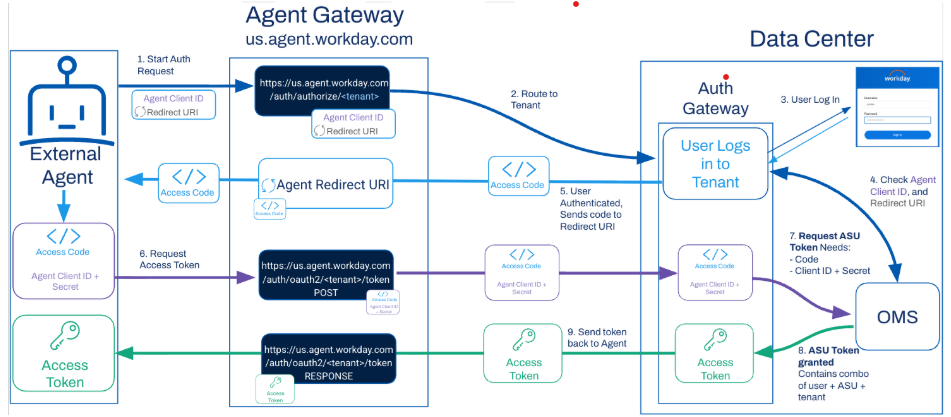
OAuth 2.0 Authentication
If your agent platform supports the OAuth 2.0 standard, it should support the standard OAuth 2.0 Authorization Code Grant authentication flow.
OAuth 2.0 Authentication
Regional Availability of Agent Gateway
Agent Gateway is available in multiple regions. Use these endpoints based on the Workday data center region that hosts your tenant:
Region | Public Regional Endpoint |
|---|---|
US | https://us.agent.workday.com |
EU | https://eu.agent.workday.com |
UK | https://uk.agent.workday.com |
CAN | https://ca.agent.workday.com |
AU | https://au.agent.workday.com |
SIN | https://sg.agent.workday.com |
IND | https://in.agent.workday.com |
JPN | https://jp.agent.workday.com |
Changing regions resets your agent analytics data in
Agent Management Hub
. To preserve your agent analytics data in Agent Management Hub
, we recommend that you avoid changing regions when possible.