
Use Case: Workday Business Object Relationships for Reporting
Audience
Professionals who are responsible for creating reports in an organization.
Overview
Workday reporting is built upon a dynamic network of interconnected business objects (BOs). These objects contain the data, relationships, and logic used throughout Workday.
In this use case, we discuss the components, structure, and relationship of business objects. Understanding how these business objects are structured vertically (Inheritance) and connected horizontally through your report’s Primary Business Object (PBO) and Related Business Objects (RBO) is essential for creating accurate reports efficiently.
Each business object is composed of:
- Instances: A dynamic reference to a single, unique record within a business object. Example: The Worker business object contains 1 instance for every worker.
- Fields: The individual attributes associated with the business object. Example: The Worker business object includes fields likeDependentsandPrimary Position.
The data source you select in your Workday report determines your report’s primary business object (PBO). When Workday runs the report, it evaluates instances of that primary business object to return your results, pulling additional data from related business objects (RBOs) as specified in your report definition.
Advanced reports display data on a granular level with 1 row for each qualifying instance, whereas Matrix reports aggregate, summarize, and pivot those instances into grouped, multi-dimensional metrics.
Horizontal Connectivity
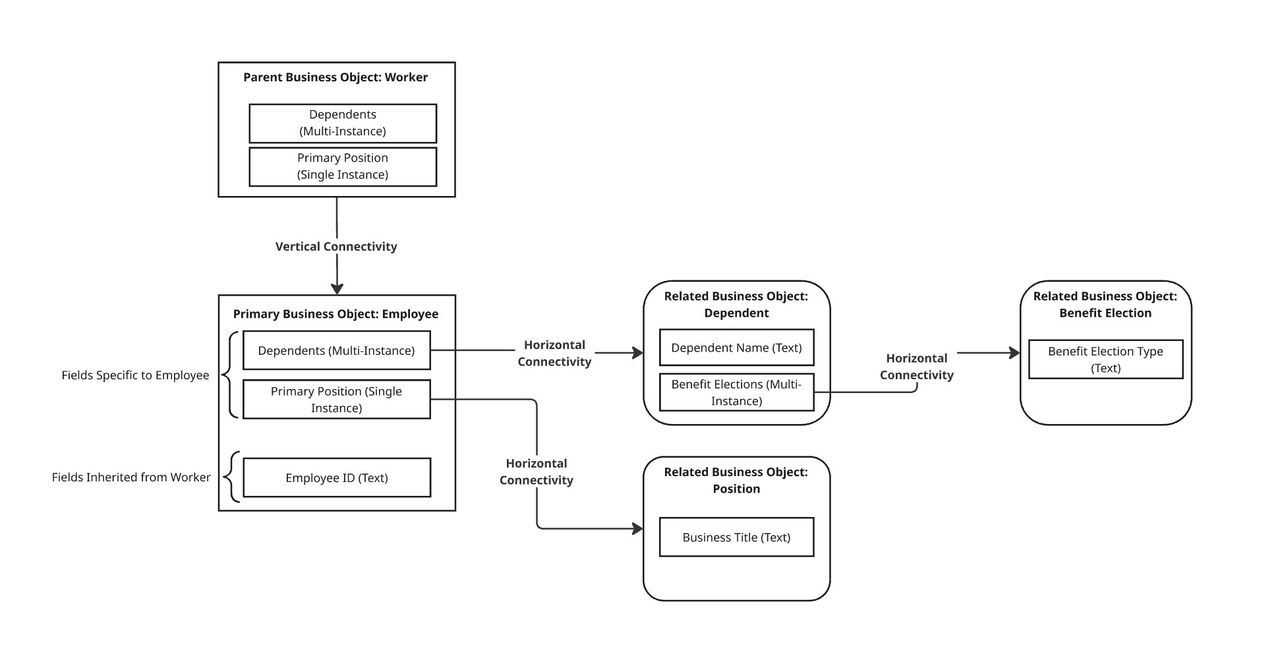
Horizontal connectivity describes how the PBO dynamically links to related data by retrieving attributes that are not directly on the PBO but exist on its RBOs. This is accomplished through Instance fields, which act as pointers connecting 1 object to another, similar to the Join functionality in SQL.
To access fields from related business objects on your report, you can also utilize reporting features such as:
- Lookup Related Value Calculated Fields
- The Business Object Column in Advanced Reports
The links between a PBO and RBO can be 1-to-1 (Single-Instance) or 1-to-Many (Multi-Instance), and determines which data you can retrieve.
Vertical Hierarchies
Vertical hierarchies define how business objects relate from parent to child. When organized vertically, a parent object defines a common set of fields available to all of its child BOs.
While child objects inherit from the parent object, the parent object aggregates all instances from its child objects. Example, if the Employee child object contains "Jack" and the Contingent Worker child object contains "Carol", the parent Worker object will automatically contain both Jack and Carol as instances.
Child objects automatically inherit every field defined on their parent, plus their own unique fields. Example: The child Employee object inherits fields from the parent Worker object. This inheritance ensures data consistency across the tenant and minimizes redundant configuration.
This diagram provides a visual representation of how primary and related business objects form the underlying framework for Workday Reporting.
Impacted Product Area
Reporting
Workday Documentation Resources
For detailed information, see Concept: Workday Reporting Relationships.