
Use Case: Reporting Tools in Workday
Audience
Financial professionals in these roles who are responsible for creating reports in an organization:
- Centralized report writers
- Accountants and financial analysts
Your organization might use different names for these roles.
Overview
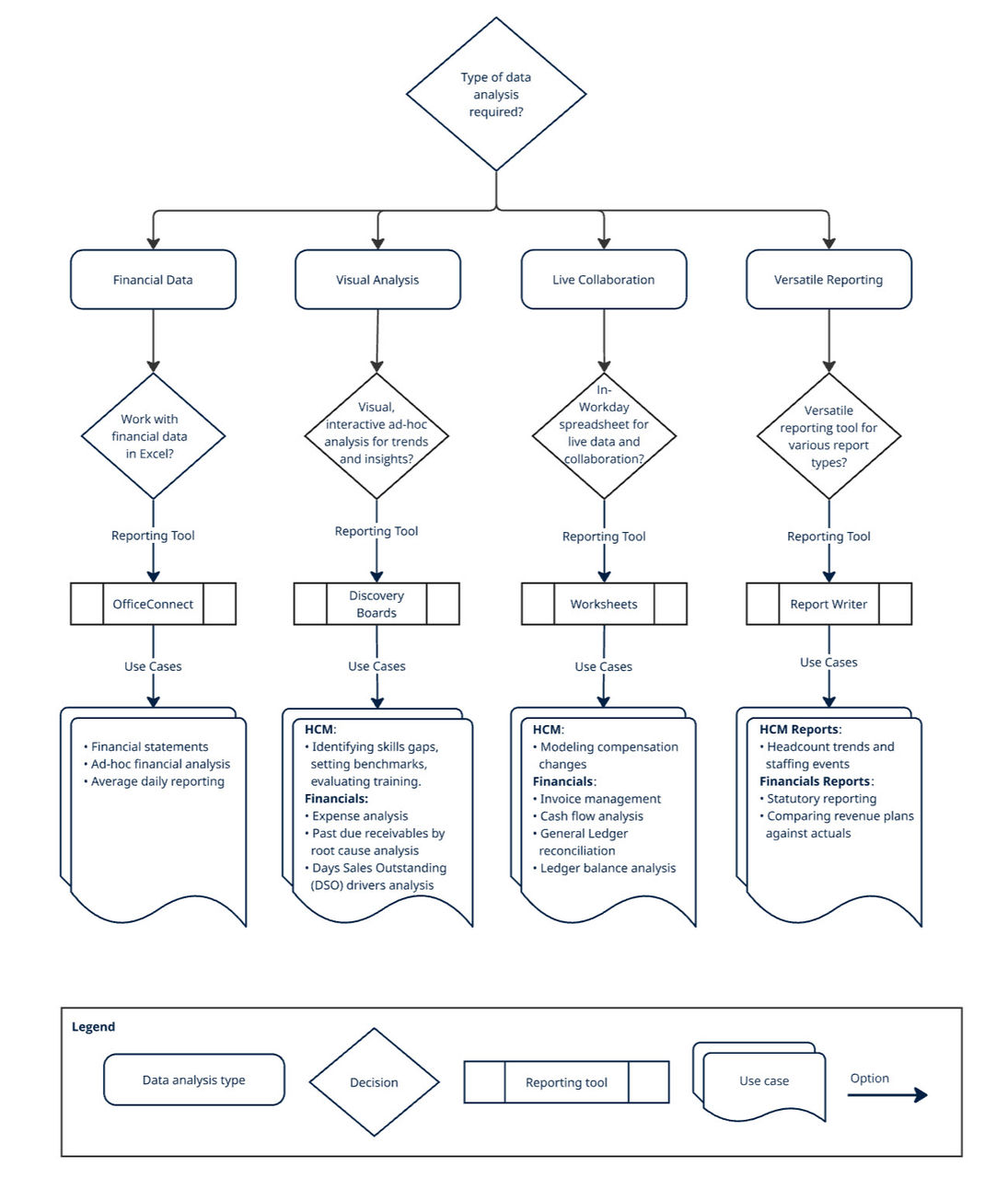
In this use case, we discuss the properties of different reporting tools available in Workday that you can use to create reports. Understanding their unique properties is key to selecting the ideal tool for your data analysis and decision-making.
OfficeConnect
You can use OfficeConnect if you primarily work with financial data in Microsoft Excel for ad-hoc queries, financial statements, or planning data.
- Description: An Excel add-in that securely connects to curated Workday financial data or Adaptive Planning data.
- Who uses it: Accountants, FP&A professionals, and financial analysts who may have limited Workday knowledge.
- Use Cases: Generating financial statements, performing ad-hoc financial analysis, and daily reporting.
- Important Considerations:
- Accessed only through Excel, not directly in Workday.
- Supports modeled data sources like Journal Lines and Plan Lines for Financial Reporting, plus Adaptive Planning.
- Integrates external data directly into the Excel file.
- Features a security option to clear data on save, requiring users to sign in and refresh for current data.
Discovery Boards
You can use Discovery Boards if you want to use self-service ad-hoc analysis with an interactive, visual interface to uncover trends and insights.
- Description: Visual data analysis tools embedded in Workday with a drag-and-drop interface.
- Who uses it: Typically created by centralized report developers and analysts, and consumed by analysts, managers, and executives for quick insights.
- Use Cases: Visual analysis across these domains:
- HCM: Identifying skills gaps, setting benchmarks, evaluating training.
- Financials: Expense analysis, understanding past-due receivables, analyzing DSO drivers.
- Important Considerations:
- Supports most indexed Workday-delivered data sources and all Prism data sources.
- Uses Workday's Drive sharing model with Can View or Can Edit permissions.
- Can access through Workday search, Drive, or direct URL.
- Displays data based on the user's security permissions.
Worksheets
You can use Worksheets, when you need a spreadsheet-like environment within Workday to collaborate and work with live, secure data, and model changes.
- Description: A spreadsheet tool directly within Workday for interacting with live data and facilitating organization-wide collaboration.
- Who uses it: Generally created by centralized report developers and analysts, and consumed by analysts, employees, and managers.
- Use Cases: Real-time data modeling and collaborative data manipulation for:
- HCM: Modeling compensation changes.
- Financials: Invoice management, cash flow analysis, general ledger reconciliation, ledger balance analysis.
- Important Considerations:
- Connects to Workday data through advanced, matrix, and composite reports.
- Uses the Drive sharing model with Can View, Can Comment, or Can Edit permissions.
- While initial data import and refresh respect user security, all users with access to the workbook can view all data within it unless Workbook Templates are used to maintain contextual security.
- Can include external data.
- Accessible via Workday search, Drive, or direct URL.
Report Writer
If none of the above specific needs apply, and you require a versatile, general-purpose reporting tool for various report types, scheduling, or integrations, you can use Report Writer as the foundational solution.
- Description: The original Workday reporting tool, handling a wide range of reporting use cases, including tabular and summarized data.
- Who uses it: Reports are typically created by centralized report writers and consumed by a broad audience, including analysts, employees, managers, business leaders, HR, and finance professionals.
- Use Cases: Highly versatile across these domains:
- HCM: Headcount trends, staffing events.
- Financials: Statutory reporting, comparing revenue plans vs. actuals.
- Important Considerations:
- Supports all Workday-delivered report data sources (RDSs), including Prism and business view data sources.
- Allows inclusion of fields from related business objects on Advanced reports.
- Supports calculated fields on all report types.
- External data only with a Prism Analytics subscription.
- Reports can be scheduled for delivery.
- Supports downstream business processes (embedded analytics) and integrations (report-as-a-service, RaaS).
- Data displayed respects the user’s contextual security.
Impacted Product Area
Reporting
Workday Documentation Resources
For detailed information, see Reference: Reporting Tools in Workday.
For more information, see: