
Concept: Supplier Punchout
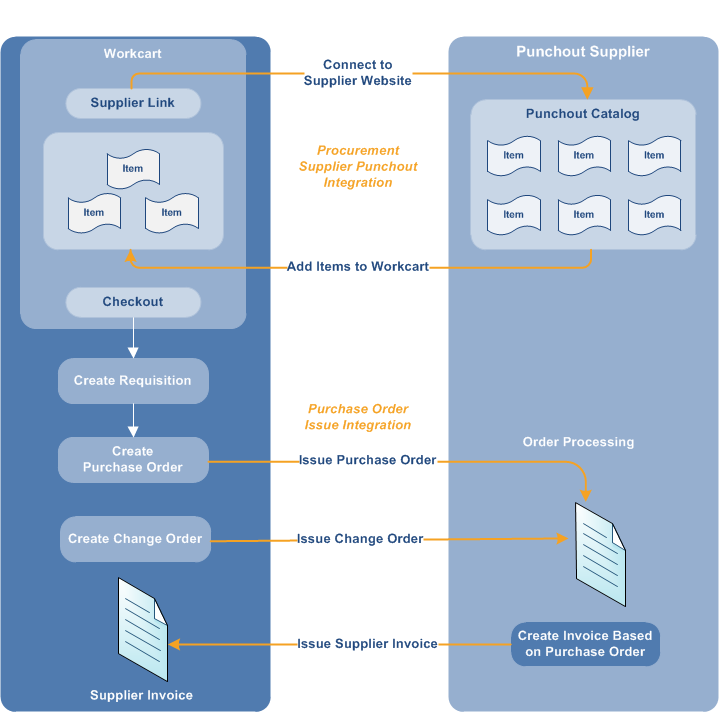
Supplier punchout connects you to the website of a supplier or marketplace so that you can
browse the catalog of 1 or more suppliers, select items to purchase, and bring the items into
your cart. When you click the punchout link from your cart, Workday opens the supplier website
and displays the items that are applicable to your company. After you make your selections and
complete your order, Workday adds the items to your cart. When you’ve returned to the cart,
you can either connect to another supplier or check out of the cart. You can create a
requisition from the punchout session and generate a purchase order. Workday sends an XML
(commerce eXtensible Markup Language) version of it directly to the supplier if you’re using
XML as a purchase order issue option.
You can configure additional functionality when you:
- Set up integrations with multiple suppliers through a marketplace. This enables you to add catalog, noncatalog, and web items from multiple suppliers to the same shopping cart.
- Enable suppliers to recognize requesters in the marketplace when you enter user attributes such asEmail Address,Employee Id,User Name, andWorker WIDon theCreate Integration Systemtask.
- Configure segmented security for supplier links used for punchout.
Issuing purchase-order based cXML supplier invoices is
specific to the Supplier Network Connector.
Two integration systems facilitate end-to-end procurement for each punchout supplier. One
integration establishes a connection from Workday to the punchout catalog on the website of
the supplier or to a supplier network. The other integration submits purchase orders to the
supplier or supplier network based on your requisitions.
You can select from preconfigured punchout suppliers in Workday, use the Supplier Network
Connector integration to access suppliers, or create punchout integrations with the suppliers
of your choice. Preconfigured suppliers in Workday include:
- Supplier Network Connector
- CDW
- Dell
- Guest Supply
- Staples
Generic integration templates are available for you to create integrations to other suppliers
who support the punchout standard.