
Concept: Evidence of Insurability Processes
The EOI review and approval process is triggered automatically when an
employee elects an amount or level of coverage over the guaranteed issue amount. The
guaranteed issue amount is the maximum amount an employee can elect without evidence of
insurability.
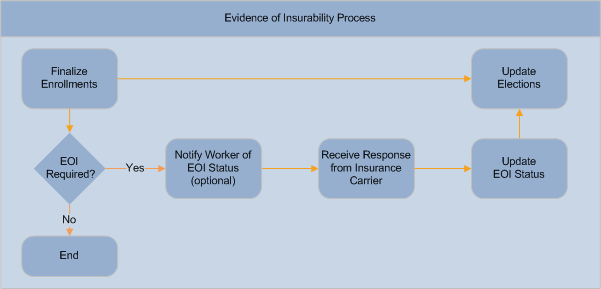
When the Benefits Administrator finalizes an enrollment event, Workday:
- Identifies:
- Employees that have elected coverage that is greater than theGuaranteed Issue AmountorGuaranteed Issue Multiplier.
- Employees that had no insurance coverage before but have elected coverage that is greater than theGuaranteed Levels Without EOI.
- Employees that had insurance coverage before but have elected coverage that is greater than theMaximum Levels of Change Allowed Without EOIorMaximum Amount of Change Allowed Without EOI.
- If an employee elects an amount or level of coverage that requires evidence of insurability, the EOI process automatically sets the employee's EOI status toPending.Use theManage Evidence of Insurability Statustask to search for employees with a status ofPending. You can also use this task to send an email notification that contains a link to the EOI form. The enrollment form Insurance section instructional text can also include a link to the EOI form.
- When the status isPending, Workday updates the employee’s coverage during the EOI review period to:a. The elected coverage, if theDefault Coverage if Pending EOIvalue isElected Coverage Amount. The effective date of coverage is determined by theEOI Takes Effect on Datefor the benefit group.b. The guaranteed issue amount, if theDefault Coverage Pending EOIvalue isGuaranteed Issue Amount. The effective date of coverage is determined by theEOI Takes Effect on Datefor the benefit group.
- When the insurance carrier approves or denies the employee's EOI claim, the Benefits Administrator enters the employee's status (ApprovedorDenied) on theManage Evidence of Insurability Statustask.You can use theManage Evidence of Insurability Statustask to send an email notification informing the employee of their new status.
- If the status isApproved, the employee's benefit coverage is updated to the elected coverage.
- If the status isDenied, Workday updates the employee's coverage to:a. The guaranteed issue amount, if the guaranteed issue amount does not equal zero. The effective date of coverage is determined by theEOI Takes Effect on Datefor the benefit group.b. The previous coverage, but only when the employee is changing plans.c. Waived, if the guaranteed issue amount equals zero.
Benefits Administrators can finalize open enrollment and other benefit
change events while the EOI process is pending. This is because Workday tracks evidence of
insurability outside of the enrollment process.