
Concept: Coordination of Benefits Enrollment Events
Coordination of events ensures that Workday:
- Processes potentially conflicting events in the correct event date order.
- Preserves existing enrollments, when possible.
Coordination of events occurs after you initiate an open enrollment, change benefits, or run the passive event process. Workday attempts to process 1 event at a time in event date priority. The event date for:
- Open enrollment = the date entered on theInitiate Open Enrollmenttask.
- Life events (excluding passive events) = the date entered on theChange Benefitstask.
- Passive events = the date when the scheduled passive event runs.
Except for open enrollment events, if more than 1 benefit event occurs on the same day, Workday consolidates those events into 1 hybrid event.
You can enable coordination of events between web service events and future-dated events created in Workday. Select
Enable Coordination of Events for the Change Benefits Web Service
in the Benefits section of the Edit Tenant Setup - HCM
task. When selected, Workday reprocesses eligible future-dated events when the web service creates earlier-dated events.The coordination of events process compares 2 events at a time:
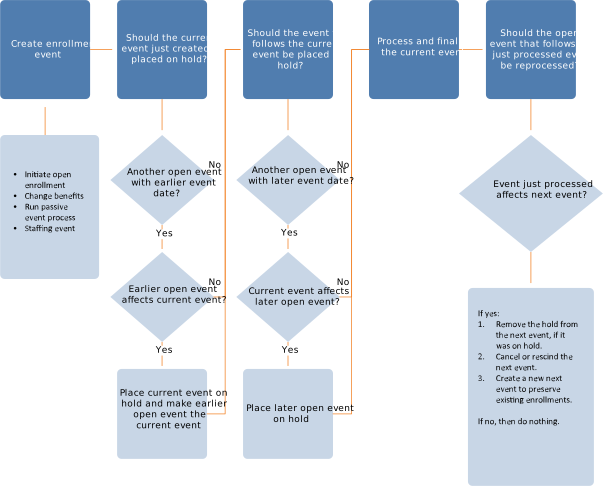
For an event to affect another event, one of these situations must occur:
- A change in eligibility: Loss or gain in coverage or a change in benefit group.Always reprocess an event when a change in eligibility occurs.
- An overlap in coverage types between the 2 events.Example: If Event A has health, dental, and vision, and Event B has health and insurance, there’s an overlap in health. Reprocess an event only when coverage types overlap.
- TheDo Not Reprocessoption is selected on the enrollment event.Workday doesn't place a new event on hold when comparing a new event (Do Not Reprocessselected) to an older open event. Workday processes both events together.Workday reprocesses the next event when comparing a new event to an older event (Do Not Reprocessselected).
- TheDo Not Reprocess Future Eventsoption is selected on the enrollment event.If Workday compares a just processed event (Do Not Reprocess Future Eventsselected) to a later event, Workday doesn't place the later event on hold. Workday processes both events together.If Workday compares a just processed event to a later event (Do Not Reprocess Future Eventsselected), Workday reprocesses the later event.
When you cancel or rescind the next event and create a new event, Workday sets the new event date to the date of the canceled event. To calculate the
Submit By
date, Workday adds the value in the Days to Enroll for Coordination of Events
field to the creation date of the new event. For the new event, Workday bases any evidence of insurability on the current benefit elections.