
Concept: Allocations
In Workday financial accounting, you can use allocations to distribute ledger amounts, usually costs, from 1 organization to another based on a preconfigured definition. You can allocate the costs either within the same company or across companies to generate intercompany allocations. When you process allocations, Workday calculates and distributes the allocation amounts to each target. It then creates the operational journals to record the allocations in the ledger.
You can also use your plan data in your allocations, helping you automate month-end journals. Or you can allocate to a target plan, creating budget amendments to help ensure that your plan data replicates your actuals.
Examples:
- A company distributesFacilitiesexpenses (such as building maintenance and staff salaries) over all cost centers that use the provided space and services. Using a square footage allocation basis methodology (created as a statistic), each cost center shares the facilities operating expenses.
- A company distributes IT costs over all cost centers based on headcount in those cost centers. This includes those costs recorded through an allocation, such as facilities expenses.
- A company allocates marketing expenses to regions based on revenue per region. The company allocates in actuals and plan for consistent reporting.
Allocations Workflow
The diagram illustrates how allocations work:
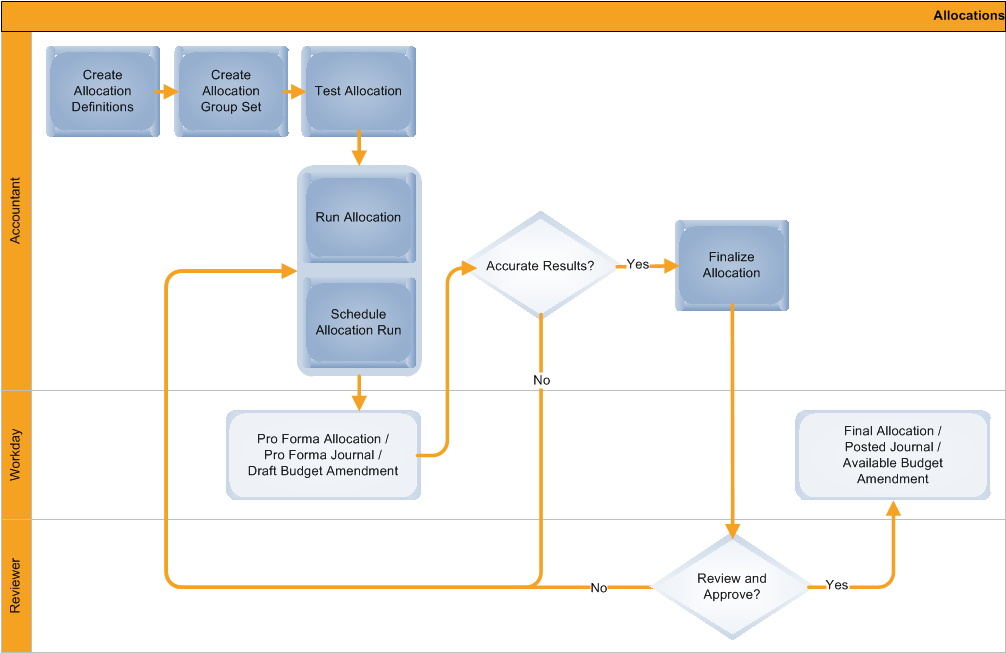
As an accountant, when you define and process allocations, you work with:
- Allocation definitions:Represent each step of an allocation and define:
- What amounts to allocate.
- How to allocate these amounts.
- Where to post the allocation results.
- Allocation group sets:A grouping of allocation definitions and their interdependencies to help you organize allocation definitions for processing.
- Testing:After defining allocation definitions and group sets, you can test them to ensure that they produce the expected results.
- Allocation runs:Generate pro forma journals or draft budget amendments of the allocations. You can manually run the allocation process or schedule Workday to run it at a specific day and time.
- Allocation results:The results of allocation processing provide support for the amounts allocated.
- Finalization:The process of finalizing your pro forma allocation and posting its operational journal or making its budget amendment available.
- Final approval: An optional business process step to verify the final allocation results before posting the allocation journal or making the budget amendment available.
When you leave allocations in
Pro Forma
status, the transactions will display on period close tasks when you close periods. The allocations remain in Pro Forma
status until you take further action.Allocation Work Area
Use the
Allocation Work Area
to:
- Monitor your allocations for a fiscal period.
- Track progress toward completion.
- Easily identify allocations that are available for finalization.
The work area, which arranges information by company and allocation group set, includes:
- ASummaryof the allocation processing, including:
- Allocations to Run: The total number of allocations in the group set.
- Draft: The number of allocations you have saved but not yet run.
- Requires Rerun: The number of dependent allocations that you need to rerun due to a change in the allocation it's dependent upon.
- Pro Forma: The number of allocations that you have run that are in pro forma status (not yet finalized).
- Error: The number of allocations that you can't post because there's an error in the allocation results.
- Processing Exceptionsto help you troubleshoot issues.
- A list ofAllocations Not Finalizedwith a button to finalize each allocation.
- Allocation Detailsfor each allocation in a group set, including whether the allocation is for actuals or a plan.