
Concept: Multicurrency
Workday provides multicurrency capabilities to meet your money management needs. These capabilities enable you to record and process business transactions that occur in a currency other than the base currency of the recording company.
Example: A USD-based company can record a sale to a French customer with a EUR denominated invoice.
Workday also factors in the impact that multiple currencies have on all appropriate gain or loss calculations and accounting for your transactions and open items.
Company's Currency
: A company's currency, also known as the ledger currency is the base currency that each company within your Workday tenant uses to generate and perform its accounting. Example: You may have companies in the U.S., Germany, and Canada, each with their own currency of USD, EUR, and CAD respectively. Since you can enter financial transactions in multiple different currencies, the company currency is essential to the accounting because Workday converts all transaction currencies into one common company or ledger currency. See Concept: Company Currency.Transaction Currency
: The currency of a submitted transaction is the transaction currency. This currency persists throughout the lifecycle of the transaction. Although Workday uses the company currency to generate accounting for transactions, you can assign foreign currencies to transactions. This might be the currency of the customer, supplier, or another currency. In most cases, the currency for an invoice and its payment will match. If it doesn't, Workday will, as part of the settlement automatically book the realized gain and loss based on the foreign exchange difference.When you approve an operational transaction, Workday generates accounting entries in the company or ledger currency. If the transaction and company currencies differ, Workday automatically converts the transaction's foreign currency into the company currency. You must therefore maintain currency conversion rates between the company currency and other currencies in which you transact. See Concept: Transaction Currency.
Bank Account Currency
: Each company bank account:- Has its own account currency in which it holds funds. This is the currency for balances and bank statements.
- Can either receive funds in all currencies or restrict currencies in which it can receive funds to a set of accepted currencies. Receiving funds in currencies other than the account currency results in rate conversions.
When your bank maintains separate balances and statements in multiple currencies for the same account number, set up a separate company bank account for each currency.
Item Currency
: The sales items, purchase items, and expense items that are configured can have their own currencies that define the value of the item. If the item and transaction currencies differ, Workday automatically converts the item's currency into the transaction currency. This occurs with requisitions, purchase orders, invoices, invoice adjustments, and expense reports.Customer and Supplier Currency
: For each customer and supplier that you define in Workday, you can assign:
- A default currency which is their preferred currency for transactions.
- Accepted currencies which are currencies that they accept.
Whenever you create a transaction (such as an invoice), in a transaction currency different than the ledger currency, you can override the default currency with any accepted currency based on your currency rate configuration. The selected currency becomes the transaction currency. You can use numerous tasks within Workday to create these transactions.
This diagram displays the flow of currencies through Workday Financial Management, as Workday converts them.
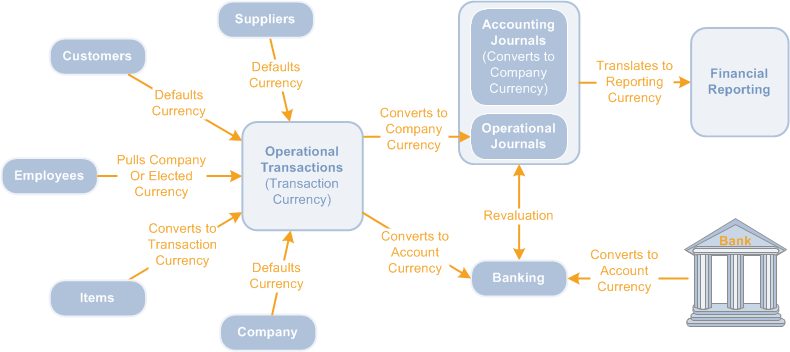
Currency flows into operational transactions from various sources, depending on the transaction. As customers and suppliers have their own currency, Workday automatically populates the currency to customer and supplier transactions. For expense reports, Workday uses the company currency of the employee or the payment election currency of the employee (if the currencies differ). When used in transactions, Workday converts items to the transaction currency. Other transactions use the company currency as the default.
From Entering Transactions to Reporting
Key steps in converting transaction currencies into reporting currencies are:
- You create transactions in different transaction currencies.
- When Workday generates operational journals from transactions, the journals are created in both the transaction currency and the ledger currency.
- At the end of the month you perform revaluation to recalculate foreign currency amounts in your ledger currency, enabling you to get more accurate ledger currency amounts. You can then use an adjustment entry to record the gains and losses caused by fluctuating exchange rates since the transaction date. See Setup Considerations: Revaluation.
- When reporting, you can report in another currency known as the reporting or translated currency. Workday uses translation rules that you define to determine conversion rates, then uses these rates in real time to translate the ledger currency into a reporting currency. See Concept: Currency Translation.