
Concept: Cash Management
The ultimate measure of a business is cash. Using Workday Cash Management,
companies can automate the coordination and control of cash flow activity. Workday also
automates administrative and control activities, such as bank statement reconciliation,
while providing embedded business intelligence.
Workday Cash Management consists of banking, settlements, and bank reconciliation tools
that enable you to manage and optimize the cash inflows and outflows for your
organization.
This diagram illustrates the flow of cash in and out of Workday:
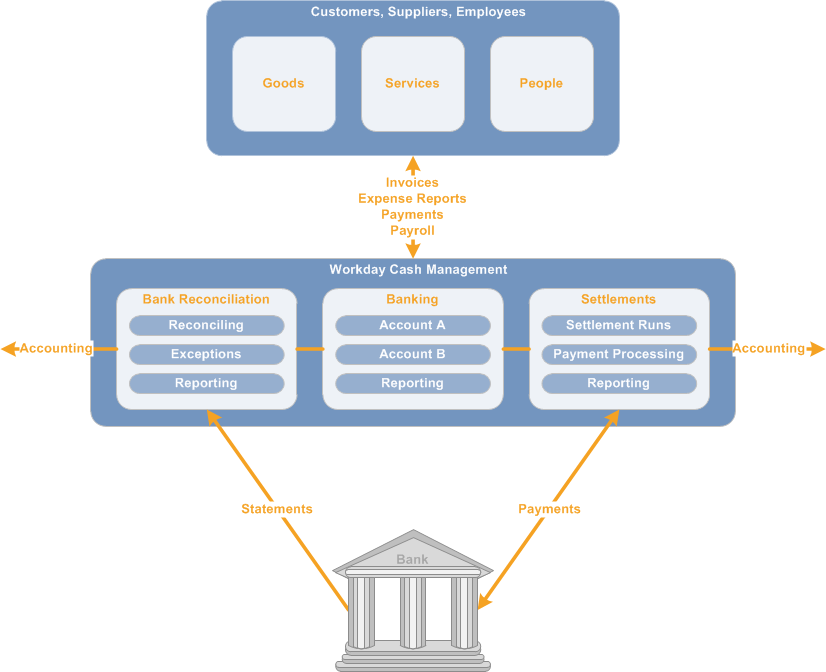
- Invoices, expense reports, payroll data, and payments flow in and out of Workday Cash Management for transactions involving goods, services, and people.You receive supplier invoices, expense reports, payroll data, and customer payments. You send out customer invoices, expense report reimbursements, payroll payments, and supplier payments. These transactions post to the bank accounts in your Workday banking system of record.
- You make payments for these transactions through settlement processing.Payments flow between the bank accounts at the financial institution and Workday settlement processing. For money owed, you can run check print processing, or you can use electronic or other forms of payment.
- You reconcile bank statement lines against account transactions through bank reconciliation processing.You can manually enter or upload (recommended) bank statements into Workday for reconciliation.
- Both settlements and bank reconciliation produce accounting data that Workday Cash Management passes to Workday Financial Accounting.
- To view and analyze your cash data, you can create reports within and across banking, settlement, and bank reconciliation tools at any time.
Workday Cash Management has multiple areas:
Banking
With Workday banking tools, you create financial institutions, branches for those
institutions, and the bank accounts that your company holds there. You can create both
depository and source bank accounts. Account transfers, voided check recordings, and
reporting give you further control of your cash.
For details, see Banking.
Settlements
Workday settlement processing enables you to pay different items together as a single
unit: expense reports; supplier invoices; ad hoc payments; payroll; customer invoices,
payments, and refunds; and intercompany items. Using the
Settlement
dashboard, you can quickly manage, analyze, and
report on all of your recent settlement run activity. To perform settlements, you first
create settlement runs to group payments and open items. Then you view, edit, and
process the settlement run. You can set the processing to run automatically, or you can
use a preview mode to view and then run manually. By using routing rules, you can define
that payments made for certain transaction types draw from specific accounts. Payment
types include direct deposit, cash, and check. Reports help you find invoices and
payments, and view your check and account registers.For details, see Settlements.
Bank Reconciliation
To reconcile bank statements against account transactions, use Workday bank
reconciliation processing. You can manually enter the statements, upload them with a web
service integration, or use a quick-entry method that creates a preliminary bank
statement out of your records.
For bank statements that you enter or upload, you manually or automatically compare
transactions to statement lines and reconcile differences. If you have many transactions
to reconcile each period, the extra setup required to perform automatic reconciliation
can save you time overall. Automatic reconciliation also provides suggested matches. You
can then automatically create ad hoc transactions for first-notice items such as bank
fees, where there are no corresponding transactions for the statement lines. Manual
reconciliation enables you to reconcile statement lines and account records that have a
one-to-many or many-to-one relationship.
For the quick-entry method, you match a preliminary bank statement based on your own
records against the printed or electronic bank statement, and reconcile as you go. When
you're done, reconciliation is complete and recorded in Workday. The only setup is to
create your bank accounts. This method is efficient for small numbers of
transactions.
Regardless of the reconciliation method you use, Workday provides additional
capabilities. You can create ad hoc transactions to reconcile any bank statement lines
that have no matching account transaction. Use the
Bank Statement
Reconciliation
dashboard for quick access to recent bank reconciliations
and analytics. Other reports give you further insight into bank statements, accounts,
and reconciliation processing.For details, see Bank Reconciliation.
Common Solutions
In addition to the cash management tools, you can set up common
solutions where applicable:
- Multicurrencyenables you to record and process business transactions that occur in currencies other than the base currency of the recording company.
- Worktags enable you to tag transactions to make their business purposes clear, establish their common relationships, and provide a multidimensional view of your business to facilitate reporting.You can associate primary balancing worktags to bank accounts using a cash balancing rule. When you settle cash transactions, Workday generates worktag balancing entries to reflect accurate balances for cash balance checks or financial reports.
- Bank Fee Analysisenables you to gain global visibility over banking costs, identify pricing inaccuracies, and negotiate optimal service agreements with your financial institutions.
- Cash Positioningenables you to determine your daily cash position based on bank account balances and external cash flows.
- Cash Forecasting with Worksheetsenables you to create cash flow forecasts for viewing in reports and dashboards. You can leverage Worksheets to model what-if scenarios using operational transactions, bank statement transactions, and external cash activities as cash forecast data. You can use the cash forecast reports to view your future cash activities for making projections and decisions on funding and investing needs.
- Intercompanyaccounting enables you to manage and report on business events involving related companies.
- Integrationshelp you to upload financial data from third parties into Workday, and to send data between systems.