
參照︰儲存格色彩和註釋圖例
對於內含全部內容連結的目錄
Excel Interface for Planning
文章,前往使用 Excel Interface for Planning
。如需有關 Web 工作表上儲存格色彩和註釋的資訊,請參閱略有不同的使用工作表。儲存格和儲存格中的資料具有不同的背景和文字顏色、字型樣式和三角形註釋。這提供了資料的快速瀏覽資訊。
您看到的內容 | 其含義 |
|---|---|
 White background with any text color | Change data if there is text of any color or if it is blank. |
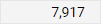 Gray background with any text color | Locked. The color or style of the text may indicate why. |
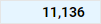 Blue background with any text color | 科目、時間、自訂維度和拆分的匯總 (總計)。您無法在中編輯這些儲存格 Excel Interface for Planning ,但您可以編輯匯總至此儲存格的儲存格。 |
 Blue text with white or blue background | Unsaved data. |
 Green text with any background color | Actuals data. The background color tells you more about the data. |
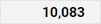 Bold text with any background color | Totals. |
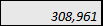 具有任何背景色彩的斜體文字 | Has a formula. The background tells you if you can change or replace the formula. |
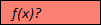 f(x) 為紅色背景?用於文字。 | Has a formula error. Or is missing data in the cells of a required column in modeled sheets. Adaptive Planning 實例,然後從導覽功能表中按一下工作表。 |
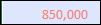 紅色文字搭配任何背景色彩。 | The formula, although correct, is referencing a cell with an error. Adaptive Planning 實例,然後從導覽功能表中按一下工作表。 |
 Red triangle in the corner of cell with any color text or background | Has a note. |