
將資料代理程式連至區域性驗證和 API 閘道
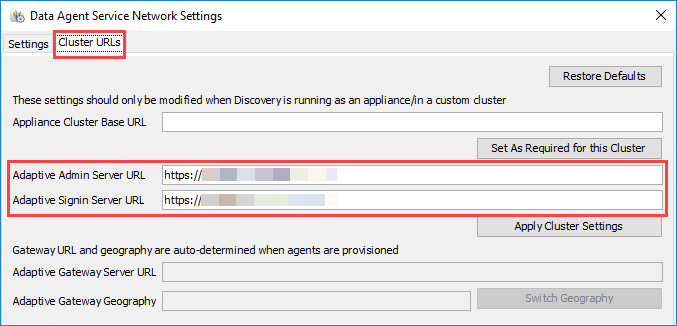
若要連至區域性驗證和 API 閘道,請在本機電腦上的 Adaptive Data Agent 中更新
Adaptive Admin Server URL
和 Adaptive Signin Server URL
。If your instance uses non-US based, regional authentication, then your authorization URLs and API endpoints vary based on your region. See Reference: Regional Authentication URLs.
Prerequisites
Prerequisites
- 必要權限︰整合 > 資料設計人員
- 確認您已在本機電腦上安裝 Workday Adaptive Planning Data Agent Manager。
- 取得您實例上 Adaptive Planning 使用者的使用者名稱和密碼。
變更 Adaptive Admin 和 Signin Server URL
- 在您的本機電腦上啟動Workday Adaptive Planning Data 代理程式。若資料代理程式版本為 7.1.44 版 (含) 以下,請在您的本機電腦上啟動Adaptive Data Agent。
- 在登入對話方塊中選取Diagnose and Configure Network(診斷和配置網路)。
- 選取Cluster URLs(叢集 URL) 分頁。
- 在Adaptive Admin Server URL和Adaptive Signin Server URL 中輸入新的 URL。
- 選取Apply Cluster Settings(套用叢集設定)。
- 關閉Diagnose and Configure Network(診斷和配置網路) 對話方塊。
- 在Adaptive Data Agent 登入對話方塊中輸入您的使用者名稱和密碼並登入。