
Concept: Hierarchies and Access Rules
Access rules
define specific intersections of data that users or groups can edit or view.Access rules use a hierarchy logic to define intersections of access. You must understand the hierarchies of the levels, accounts, and dimensions you are securing. The hierarchies affect the access rules you create.
Hierarchy Terminology
Color-Schemed Hierarchy
| General Hierarchy Terms
|
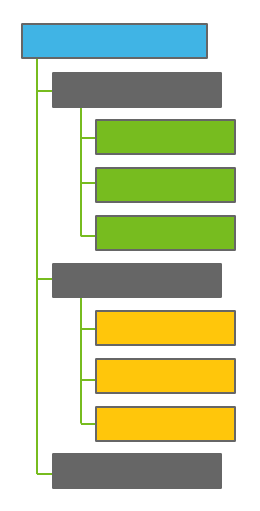
| Blue
Grays
Greens and Yellows
Leaf Levels The yellows, greens, and the last gray are leaf levels in the hierarchy , because they have no children . |
- More on Account Hierarchies
- There's separate account hierarchies for general ledger, custom, metric, and assumptions accounts. Also, each cube and modeled sheet has its own account hierarchy. For the accounts, the blue is either the type of account, or the name of the cube or modeled sheet.If a gray account has children, it's either an account group or an account rollup. Account groups don't hold totals. Accounts rollups hold the total of descendant accounts. If an account doesn't have descendants, it's a leaf level account.
- More on the Level Hierarchy
- Every model has one level hierarchy, also called the organization structure. Some instances use level dimensions (custom dimensions with a level setting) to create alternate level hierarchies. Because you can't secure level dimensions, the only way to give access to levels is through the main level hierarchy.The blue is always thetop level, named whatever your admin named it. Every parent level has an (Only) level, which rolls up to the parent level. The last gray is the Top Level (Only) level. The last green and the last yellow are the (Only) levels for the respective gray parents.
- More on Custom Dimension Hierarchies
- There are hierarchical dimensions and list dimensions. A hierarchical dimension has values that roll up to other values. A list has one level of values.List Dimension ExampleHierarchical Dimension ExampleProduct (All)
- T-shirts
- Sweaters
- Jackets
- Product Uncategorized
Product (All)- T-shirts (All)
- Graphic T-shirts
- Solid T-shirts
- T-shirts Uncategorized
- Sweaters
- Jackets
- Product Uncategorized
The blue is the name of dimension, and the dimension rollup, or theAllvalue. The grays are the dimension values. The last gray, for both lists and hierarchical dimensions, is theroot uncategorized value.The root uncategorized valuetags data points that weren't tagged explicitly with a dimension value. In the examples, Product Uncategorized is theroot.A list dimension only has grays. For hierarchical custom dimensions, like T-shirts in the example, every value with descendants has anuncategorizedvalue and anAllvalue.
Hierarchies and Access Rules
General hierarchy rules for access:
- Access to a parent includes all descendants. You can't use other rules to remove access to descendants once you grant access to parents.
- Access to children doesn't include ancestors. So you can restrict a user from seeing any rollups by only giving access to children accounts and levels.
- All rules include access to theroot uncategorizedvalue of secured dimensions .
- The only way to give access to (Only) levels is to give access to the parent.
Using the below example hierarchy for levels, the tables show you the result of each rule or series of rules in the template.
HQ
- G&A
- HR
- Legal
- Product Development
- Operations
- Engineering
- When you use the Grant column:
- Rule with Granted LevelsResulting Level Hierarchy for User
 Explanation: When you grant G&A, you grant all descendants, no ancestors.G&A
- HR
- Legal
- G&A (Only)
 Explanation: When you also grant Operations, you don't grant its siblings or ancestor.G&A
- HR
- Legal
- G&A (Only)
Operations Explanation: The new rule is invalid. You cannot add a rule that restricts the descendant of a granted parent.No change
- When you use the Grant All Except Column
- Rule with Grant All Except LevelsResulting Level Hierarchy for User
 Explanation: When you grant all except G&A, you also exclude G&A's ancestors and descendants.Product Development
- Operations
- Engineering
- Product Development (Only)
 Explanation: You can add a rule that grants a child of a restricted parent.HRProduct Development
- Operations
- Engineering
- Product Development (Only)
Secured Custom Dimensions and Intersections
All data points intersect at a specific level, account, time period, and version. All data also intersects at every custom dimension in your model. For custom dimensions:
- Data intersects at theroot uncategorizedvalue when you don't tag data with a custom dimension value.
- Data intersects at theallvalue of all the custom dimensions at all level, account, and custom dimension rollups.
To see any rollup value on a sheet, you need access to all descendants of all rollups. On a report, unless it is a metric account, you can see a partial rollup value. In sheets, you may not see accounts or levels at all if you don't have access to the rollup. In reports and charts, the rollups display partial rollup values. Partial rollup values include only the contributing values that you can access.
For more information, see Access Rules and Your Model.