
参考信息:单元格颜色和注释方法图例
获取包含所有内容链接的目录
Excel Interface for Planning
文章,请转至“使用”。 Excel Interface for Planning
。有关 Web 工作表上的单元格颜色和注释的信息,请转至使用工作表,该章节略有不同。单元格和单元格中的数据具有不同的背景色和文本颜色、字体样式和三角形符号。从而提供有关数据的快速概览信息。
您看到的内容 | 含义 |
|---|---|
 White background with any text color | Change data if there is text of any color or if it is blank. |
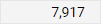 Gray background with any text color | Locked. The color or style of the text may indicate why. |
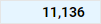 Blue background with any text color | 账户、时间、自定义维度和拆分的汇总(总计)。您无法在中编辑这些单元格 Excel Interface for Planning ,但您可以编辑汇总到此单元格的单元格。 |
 Blue text with white or blue background | Unsaved data. |
 Green text with any background color | Actuals data. The background color tells you more about the data. |
 Bold text with any background color | Totals. |
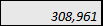 具有任何背景色的斜体文本 | Has a formula. The background tells you if you can change or replace the formula. |
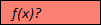 带有 f(x) 的红色背景?用于文本。 | Has a formula error. Or is missing data in the cells of a required column in modeled sheets. Adaptive Planning 在线实例,然后单击导航菜单中的“工作表”。 |
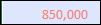 具有任何背景色的红色文本。 | The formula, although correct, is referencing a cell with an error. Adaptive Planning 在线实例,然后单击导航菜单中的“工作表”。 |
 Red triangle in the corner of cell with any color text or background | Has a note. |