
Steps: Set Up Intercompany Eliminations
Intercompany elimination is the process of removing the financial effect of at least two account balances that should have no financial impact on their common parent. You can use either splits or attributes to trigger elimination rules. Choose the method that best fits your ERP system. Contact professional services or your implementation partner for guidance.
Why Use Intercompany Eliminations
Use eliminations so you can accurately report total company results. For example, a company owns Division A and B. Division A sold 10,000 to Division B. This appears as a profit for Division A and a cost for Division B. For the parent company, the profit of one division should cancel out the cost of the other division. The two statements below show how eliminating provides more accurate records for the parent company.
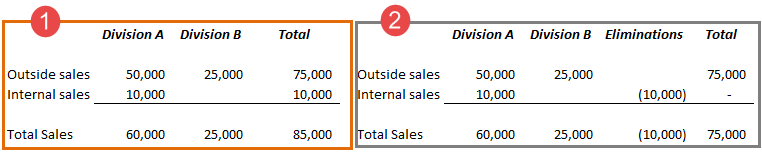
1 | In this statement the parent company reports the 10,000 trade between its division as a total sale. |
2 | In this statement, the 10,000 trade is eliminated. The total company does not count the trade as a profitable sale. |
Terminology
Elimination method
refers to the two methods available in your model for consolidation: the attribute method or the splits method.
A
trading partner
is an entity that does business with another entity within the same company. In your model, trading partners are designated levels. An
elimination level
is some ancestor level that both trading partners roll up to. The elimination level is the level where you want to eliminate the financial impact of the trading partner transactions. Intercompany accounts
are accounts that hold the intercompany data of trading partners. An account setting indicates that it's an intercompany account.Intercompany sheet
is the standard sheet you must create for the splits method. The sheet holds the intercompany data. Attributes Method
When you choose attributes, you get a special attribute with your model. The name of the attribute matches the label your admin chooses in General Settings. The attribute values correspond to levels designated as trading partners. With this method you must create accounts for each trading partner level. You must tag the accounts with the trading partner attribute values. Then use only those accounts to record intercompany transactions. For example with this method, you could create an accounts payable and an accounts receivable for each pair of trading partner levels. Then use only those accounts to record intercompany transactions between partners. Splits Method
With splits, you get a system-defined dimension with your model. The name of the dimension matches the label your admin chooses in General Settings. The dimension values correspond to levels designated as trading partners. With this method, you build a standard sheet with the accounts designated as intercompany accounts, and the trading partner system dimension. Then enter all intercompany transactions on the sheet as splits tagged with the appropriate trading partner dimension value. Prerequisites
Prerequisites
- Contact professional services or your implementation partner to get the consolidation capability.
- Eliminations is one of the consolidation solutions available. See Concept: Consolidation.
- Security: Permissions indicated in each article.
Steps
Steps
- (Optional) Change the Trading Partner Label. This is the label that appears for the trading partner dimensions or attribute, and the level and account settings.
- Create Trading Partner and Elimination Levels. This creates the corresponding the Trading Partner attribute or dimension values.
- (Splits method only) Build Intercompany Transaction Sheet.
- Enter trading partner transaction in sheets. See: