Concept: Integrate With NetSuite
Adaptive Planning
is NetSuite 2023.1 BFN certified.There are two different ways in which
Adaptive Planning
integrates with NetSuite:
- NetSuite Integration - Basic
- Adaptive Integration with NetSuite Enhancements
They interact with NetSuite in slightly different ways.
Imports from NetSuite
If you have Adaptive Integration with NetSuite Enhancements
only use the Adaptive Integration > Design Integrations
menu to manage import mappings when you need to import data from NetSuite.
Do NOT use the
Integration > Import
menu's mappings screens if you have Adaptive Integration with NetSuite Enhancements.Transaction Drill-through
NetSuite Drill-through is only available if you set up your NetSuite Integration before August 12, 2024.
Transaction Drill-through can be achieved in one of the following ways:
- Both NetSuite Integration Basic and Adaptive Integration with NetSuite Enhancements allow for drilling back into NetSuite on the standard categories. This requires that the user have a NetSuite seat.
- It is also possible to import NetSuite transactions into theAdaptive PlanningTransactions module and allow drill-through into those transactions withinAdaptive Planning. This can be achieved through Adaptive Integration with NetSuite enhancements and theAdaptive PlanningTransactions module. An integration task can be set up to automate the import of transactions intoAdaptive Planning. This approach does not require individual NetSuite seats for business users who need drill-through. If you need to drill into transactions for more than the standard NetSuite categories, then import transactions intoAdaptive Planningand use the Transactions Module.
Exports into NetSuite
Export of data from Adaptive Planning
to NetSuite can be achieved in the following ways:
- Using NetSuite Integration BasicExport mappings need to be created in order to exportAdaptive Planningdata back into NetSuite. If you are using the Basic option to export, then the export process is manual and cannot be scheduled.If you are using NetSuite Integration Enhancements for importing data, you need to maintain import mappings throughIntegration > Design Integrations, and export mappings throughIntegration > NetSuite Export Category Mappings.
- Using Adaptive Integration with NetSuite EnhancementsYou can choose to manage both import and export through Adaptive Integration with NetSuite Enhancements. In this case, you will need to manage export data through a Scripted Export Loader within Adaptive Integration. This option allows for automation of the export process and creating scheduled exports. It requires implementation of export scripts through Adaptive Professional Services and the installation of an on-premises data agent. For more details see Steps: Set Up NetSuite Data Sources.
Comparing the Options to Integrate with NetSuite
NetSuite Drill-through is only available if you set up your NetSuite Integration before August 12, 2024.
NetSuite Integration - Basic | Adaptive Integration with NetSuite Enhancements | |
|---|---|---|
Requires installation of the Adaptive Insights for NetSuite bundle | YES | YES |
Enables Drill Through to NetSuite | YES | YES |
Menu used to manage mappings for import | Integration > Import Account Mappings
Integration > Import Level Mappings | Integration > Design Integrations |
Menu used to manage mappings for export | Integration > Export Account Mappings
Integration > Export Level Mapping | Set up a scripted export loader and manage mappings within Integration > Design Integrations |
Requires Professional Services | NO | YES
|
Exports NetSuite's 6 standard categories (Account, Subsidiary, Department, Class, Item, Customer) | YES | YES
|
Allows Imports of NetSuite's custom objects and custom segments | NO | YES |
Imports Standard Sheets | YES | YES |
Automated import into any Planning sheet | NO | YES |
Automated import of transactions in Transactions module in Planning | NO | YES |
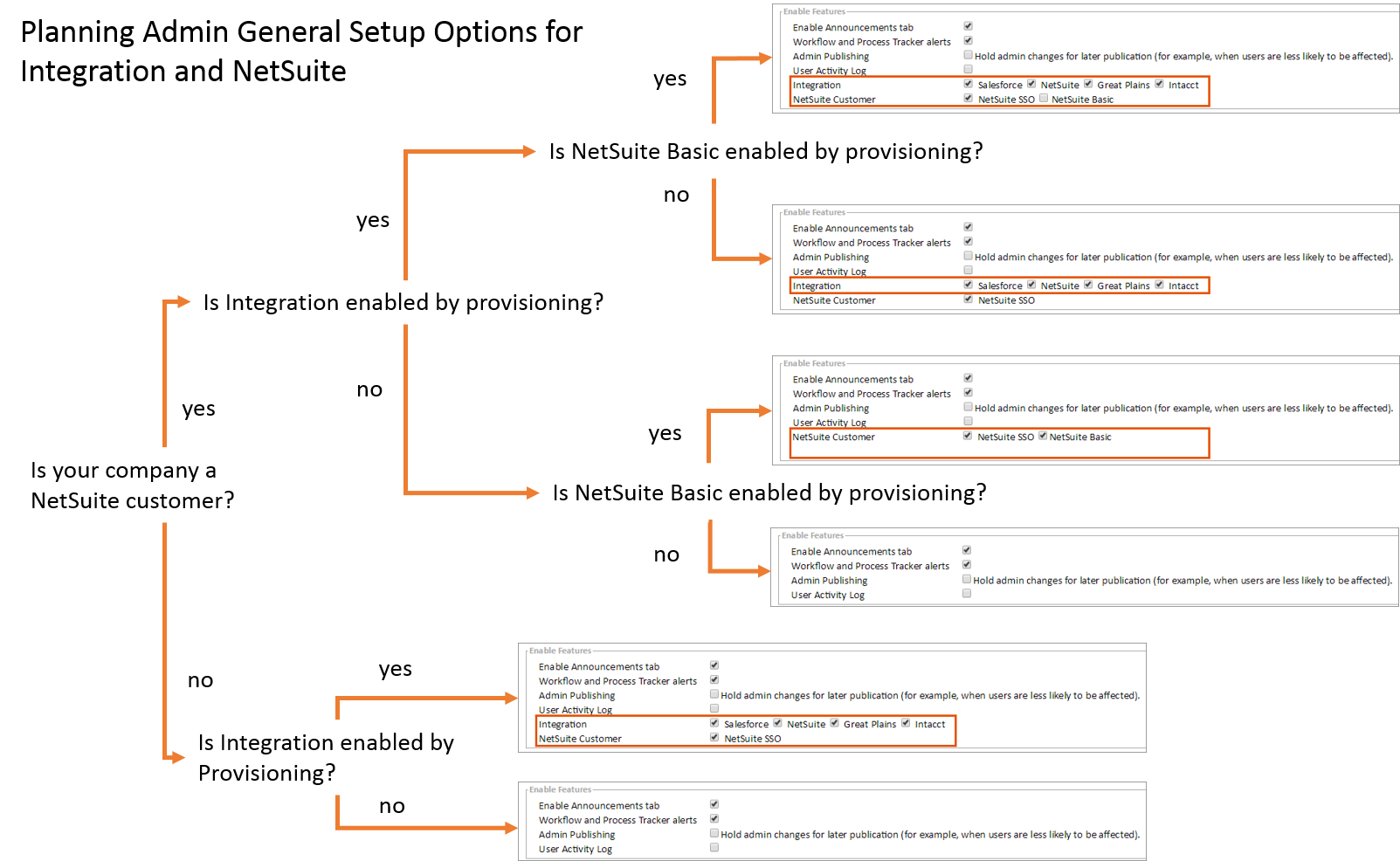
Planning Administration General Setup Options for Integration and NetSuite
The diagram below illustrates the Integration and NetSuite options visible to administrators within Administration > General Setup.
Although both Integration's NetSuite data source and NetSuite Basic can be enabled simultaneously, using only Integration's NetSuite data source is recommended because it provides more complete access to NetSuite data.
The options shown below for Integration and NetSuite are provided in the General Setup screen to let company administrators choose the setup they need for their use case.
The
Integration: <data source type>
options allow an administrator to limit what data source types can be created within Adaptive Integration's Data Designer screen. If only NetSuite is enabled, only new NetSuite data sources can be created in the Data Designer screen.The
NetSuite Customer: NetSuite Basic
option enables the NetSuite specific menus available within Adaptive Planning
's main navigation.NetSuite Drill-through is only available if you set up your NetSuite Integration before August 12, 2024.