
Referência: cores de células e legenda de notações
Para obter um sumário com links para todos
Excel Interface for Planning
artigos, vá para Como usar Excel Interface for Planning
. Para obter informações sobre cores e notações de células em planilhas da Web, acesse Como usar planilhas, que é um pouco diferente.As células e os dados nas células têm diferentes cores de fundo e de texto, estilos de fonte e notações de triângulo. Esses recursos apresentam informações rápidas sobre os dados.
O que você vê | O que isso significa |
|---|---|
 White background with any text color | Change data if there is text of any color or if it is blank. |
 Gray background with any text color | Locked. The color or style of the text may indicate why. |
 Blue background with any text color | Consolidações (totais) para contas, tempo, dimensões personalizadas e divisões. Você não pode editar estas células no Excel Interface for Planning , mas você pode editar as células que consolidam nesta célula. |
 Blue text with white or blue background | Unsaved data. |
 Green text with any background color | Actuals data. The background color tells you more about the data. |
 Bold text with any background color | Totals. |
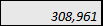 Texto em itálico com qualquer cor de plano de fundo | Has a formula. The background tells you if you can change or replace the formula. |
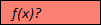 Plano de fundo vermelho com f(x)? para texto. | Has a formula error. Or is missing data in the cells of a required column in modeled sheets. Adaptive Planning instância on-line e clique em Planilhas no menu de navegação. |
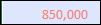 Texto em vermelho com qualquer cor de plano de fundo. | The formula, although correct, is referencing a cell with an error. Adaptive Planning instância on-line e clique em Planilhas no menu de navegação. |
 Red triangle in the corner of cell with any color text or background | Has a note. |