Concept: Partial Attribute Rollups in Cube Sheets
When you add attributes to cube sheets, you have the option to include some attribute values while excluding others. When you add only some attribute values, you create partial rollup values in the sheet. Partial rollup values display based on how your team manipulates the sheet view from the
Sheets
area.Example: You previously tagged only the
Finance
level with the West Coast
attribute value. When you build the cube sheet, you add all the levels to the sheet. You also add the Region Level Attribute
to the sheet. You include the West Coast
value, the attribute rollup, which is Region Level Attribute
, and none of the other attribute values: 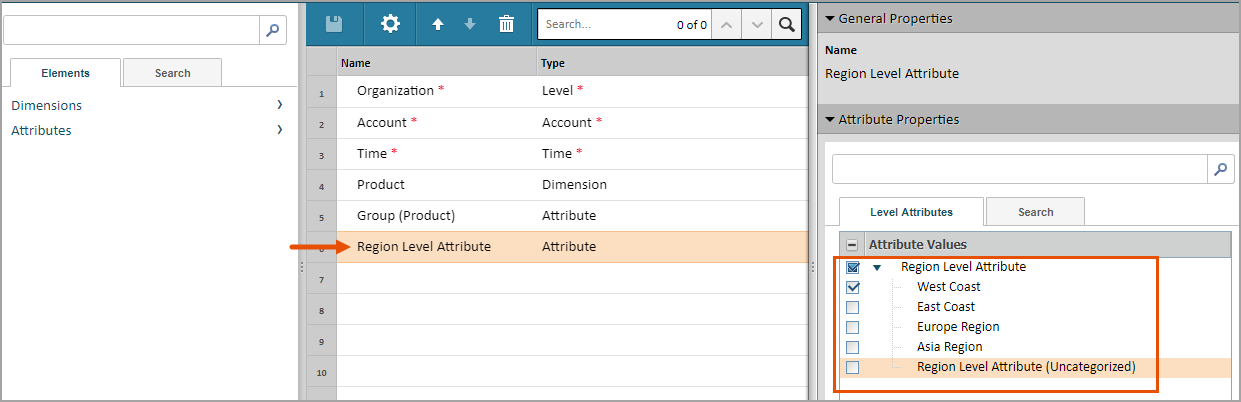
The result on the cube sheet:
- All the levels you previously added are still available on the sheet, not just those levels tagged withWest Coast.
- When you drag only the attribute to the rows, we display only theWest Coastattribute value and the attribute rollup. The rollup value is a partial rollup. The rollup value includes only data tagged withWest Coast.
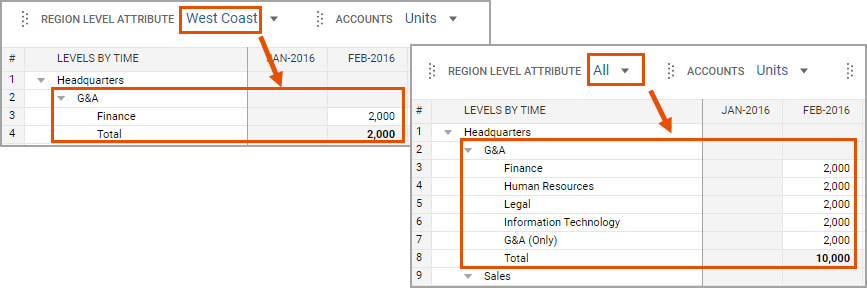
- When you move the attribute to the cube filters, the options in the drop-down list include onlyWest CoastandAll.
- When you selectWest Coastfrom the filter, the sheet filters the levels to display only levels tagged withWest Coast. The rollups are partial rollups. They include only data tagged withWest Coast.
- When you selectAll, the sheet displays all the levels in the rows. The attribute rollup forAllincludes all level data on the sheet.