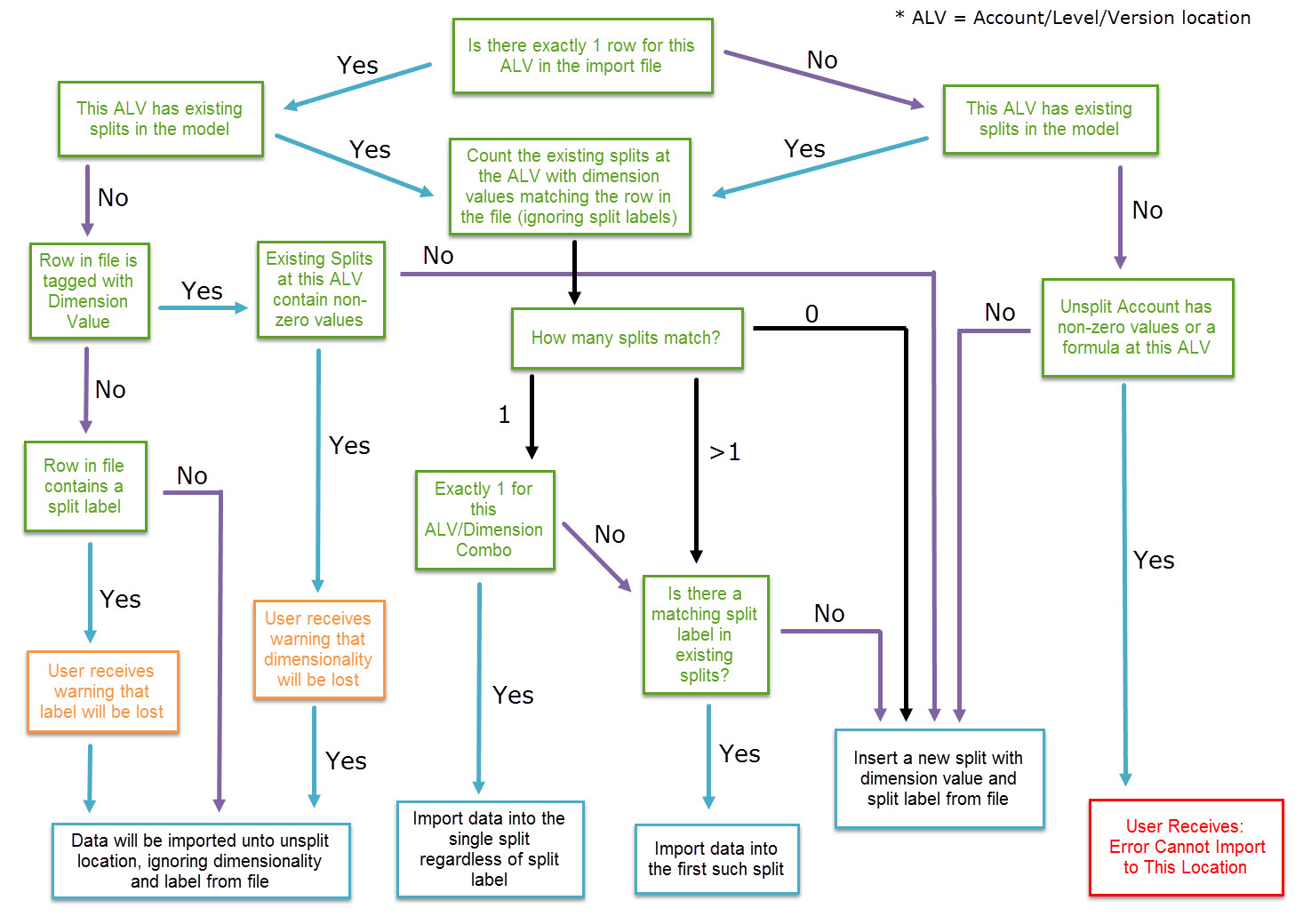
Split Behavior when Importing
This article includes suggestions and workarounds. Content may not be accurate for all use cases or represent best practices for the latest release.
Question
How do imports work when they contain splits? I keep receiving an error message when trying to import a file with splits. What might be causing the error?
Answer
- If theaccount/level/versioncombination to which you areimportingcontains no data(account is blank in all time periods), any splits in the import template arecreated automatically.
- If theaccount/level/versioncombination to which you areimportingcontains data(in any time period in the versions), the following is true:
- If you are importing one split to a particular account/level/version combination, you will get the Warning message and the data will be placed in the unsplit account. If you want to create a new split/tag the data with the dimension, you need to go to that location in the sheet and manually add one split. The reason that you have to do this is because you have to specify in which split the data in the main account is placed and how it is labeled.
- If you are importing more than one split to a particular account/level/version combination, you will get an Error message and you have to create the first split manually in the sheet.
- A warning message means that the data still imported. If there is an error message, the data is NOT imported. The presence of a single Error will cause the ENTIRE file upload to fail, not just the line(s) containing the Error.
- Animportthat containsblank Split Labelswill create new splits in the system for an account thatalready contains splits. The system does NOT match and align all blank split labels associated with a particular level/account combination.
- If you are importing an entry that istagged with a dimensionand an entry that does not have an associated dimension or a Split Label, the system willNOTimport the value that does not have an associated dimension or a Split Label. In this scenario we would recommend creating a dimension value called _ and associate all blank entries on the import with the underscore.
- Erase Actuals will erase splits if the process of erasing Actuals causes the split to become empty. An empty split is one where there is no value nor cell note. Please note, splits that are already empty will remain untouched.