
Reference: NetSuite Data Source Tables and Data Types
Supported NetSuite Tables
The table below shows information about the tables supported in NetSuite Integration. The columns for this table show the following information:
- Integration Table: The name of the table as shown in the integration data source.
- TableSource: The name of the table as used in the NetSuite Schema Browser.
- Access: The access mechanism for each NetSuite table. The types are:
- Search means Integration brings across all records that match the search criteria using the specified API. Constrained search means Integration imposes additional constraints on the search in addition to any search constraints NetSuite may impose.
- Get all means Integration brings across all the records using the specified API.
- Differential means Integration brings across only the data that has changed.
- Comments: Comments about the tables.
Integration also supports custom NetSuite tables that are exposed by the NetSuite Web Services API. You can choose which table/columns to import for each one.
Integration Table | Table Source | Access | Comments |
|---|---|---|---|
Account | AccountSearchRowBasic | Search | |
AccountingPeriod | AccountingPeriodSearchRowBasic | Search | |
AdaptivePostingTransactionSummary | Table created in the Integration data source, not available inNetSuite. Joins thePostingTransactionSummary table with the standard category tables (Account, Time Period, Subsidiary, Department, Class, Location, Item,Customer) | ||
AllCustomLists | CustomList | Get all | |
Budget | BudgetSearchRowBasic | Search | |
BudgetExchangeRate | Special:getBudgetExchangeRate | Constrained search | |
CalendarEvent | CalendarEventSearchRowBasic | Search | |
Campaign | CampaignSearchRowBasic | Differential | |
CampaignCategory | CampaignCategory | Get all | |
CampaignFamily | CampaignFamily | Get all | |
Classification | ClassificationSearchRowBasic | Search | |
ConsolidatedExchangeRate | Special:getConsolidatedExchangeRate | Constrained Search | |
Contact | ContactSearchRowBasic | Search | |
Currency | Currency | Get all | |
CustomerCategory | CustomerSearchRowBasic | Differential | |
CustomerStatus | CustomerCategorySearchRowBasic | Search | |
DeletedRecord | Special: getDeleted | Constrained search | Not for use by end user |
Department | DepartmentSearchRowBasic | Search | |
Employee | EmployeeSearchRowBasic | Differential | |
EntityGroup | EntityGroupSearchRowBasic | Differential | |
ExpenseCategory | ExpenseCategorySearchRowBasic | Search | |
Item | ItemSearchRowBasic | Differential | |
Job | JobSearchRowBasic | Differential | |
JobStatus | JobStatusSearchRowBasic | Search | |
JobType | JobTypeSearchRowBasic | Search | |
Location | LocationSearchRowBasic | ||
NetSuiteServerTime | Special:getServerTime | ||
Opportunity | OpportunitySearchRowBasic | ||
Partner | PartnerSearchRowBasic | ||
PostingTransactionBalance | Special:getPostingTransactionSummary | Constrained search | Table created in the Integration source, not available inNetSuite. This table contains period ending balances. |
PostingTransactionSummary | Special:getPostingTransactionSummary | Constrained search | |
ProjectTask | ProjectTaskSearchRowBasic | Differential | |
PromotionCode | PromotionCodeSearchRowBasic | Search | |
SalesTaxItem | SalesTaxItem | Get all | |
Subsidiary | SubsidiarySearchRowBasic | Search | |
SupportCase | SupportCaseSearchRowBasic | Differential | |
SupportCasePriority | SupportCasePriority | Get all | |
SupportCaseStatus | SupportCaseStatus | Get all | |
SupportIssue | IssueSearchRowBasic | Search | |
SupportSolution | SolutionSearchRowBasic | Search | |
SupportTopic | TopicSearchRowBasic | Search | |
Task | TaskSearchRowBasic | Search | |
TaxGroup | TaxGroup | Get all | |
TaxType | TaxType | Get all | |
Timebill | TimeBillSearchRowBasic | Differential | |
Transaction | TransactionSearchRowBasic | Differential | |
Vendor | VendorSearchRowBasic | Differential |
Commonly Used Tables in Integration
The following tables are made importable out-of-the-box in the NetSuite Adapter:
- AdaptivePostingTransactionSummary (primary source table for Planning)
- Account (mapped toAdaptive PlanningAccounts)
- Classification (optional mapping)
- Customer (optional mapping)
- Department (optional mapping)
- Items (optional mapping)
- Location (optional mapping)
- Posting Transaction Summary
- Subsidiary (usually Mapped toAdaptive PlanningLevels)
The AdaptivePostingTransactionSummary and PostingTransactionSummary tables return a monthly delta, whereas the PostingTransactionBalance table returns period balances. The AdaptivePostingTransactionSummary and PostingTransactionSummary tables support the standard categories (Account, Time Period, Subsidiary, Department, Class, Location, Item, Customer). If you need additional categories you must use the Transaction table.
Differentially Updated Tables
In the current NetSuite data source, the following tables are differentially updated:
- Campaign
- Customer
- Employee
- EntityGroup
- Item
- Job
- Opportunity
- Partner
- ProjectTask
- SupportCase
- TimeBill
- Transaction
- Vendor
In addition, all Custom Record types are differentially updated. You cannot use the Differential Date Column in your data import filter for differentially updated tables. The system does not prevent you from trying to do this, but it will cause the differential update mechanism to fail.
You can limit the amount of data imported in a differential table when you are "exploring," that is, changing columns and filter settings. There is a mechanism in the data source to short circuit the full load of differential data.
The table below contains all the differential tables along with their differential and creation date columns.
Table
| Differential Date Column
| Creation Date Column
|
|---|---|---|
Campaign | LastModifiedDate | CreatedDate |
Customer | LastModifiedDate | DateCreated |
CustomRecord (*) | LastModified | Created |
Employee | LastModifiedDate | CreatedDate |
EntityGroup | LastModifiedDate | -- None -- |
Item | Modified | Created |
Job | LastModifiedDate | DateCreated |
Opportunity | LastModifiedDate | DateCreated |
Partner | LastModifiedDate | DateCreated |
ProjectTask | LastModifiedDate | CreatedDate |
SupportCase | LastModifiedDate | CreatedDate |
TimeBill | LastModified | DateCreated |
Transaction | LastModifiedDate | DateCreated |
Vendor | LastModifiedDate | DateCreated |
(*) - This applies to all Custom Records.
If you specify a greater-than or a great-than-or-equal filter on the Creation Date Column for your table, the code bypasses the full import and just differentially updates from the specified date and time. This is helpful for limiting the imported data because when you start exploring a large differentially uploaded table, you can set the filter to extract only the last few days' (or weeks') worth of data. This kind of load runs very quickly. You can then figure out what columns you need and what other filter conditions you want to use. Once you are satisfied, you can remove the creation date filter and restart the full data load.
For some tables you may not ever want records older than a certain date. For these tables you can continue to use the creation date filter with an appropriate value.
Supported NetSuite Data Types
As data from NetSuite is imported into Integration, the 'type' of that data must be mapped to one of the data types supported by integration.
- Standard NetSuite Data Fields
- For standard NetSuite data fields in searched' tables, the following mappings are used:NetSuite Standard Search Data TypeIntegration Data TypeSearchColumnStringFieldTextSearchColumnSelectFieldTextSearchColumnEnumSelectFieldTextSearchColumnDoubleFieldFloatSearchColumnBooleanFieldBooleanSearchColumnLongFieldIntegerSearchColumnTextNumberFieldTextSearchColumnDateFieldDateTime
- Standard NetSuite Data Fields in Tables
- For standard NetSuite data fields in tables (which are always fetched in their entirety), the following mappings are used:NetSuite Standard Data TypeIntegration Data TypeStringTextRecordRefTextDoubleTextBooleanFloatLongBooleanSystem.DateTimeFloatInteger
- Custom Fields
- The NetSuite Data Source supports a subset of the possible custom NetSuite custom fields.Custom fields are supported on the following record types:
- CRM Custom Fields
- CalendarEvent
- Campaign
- SupportCase
- SupportIssue
- SupportSolution
- ProjectTask
- Task
- Custom Entity Fields
- Contact
- Customer
- Employee
- Entity Group
- Job
- Partner
- Vendor
- Custom Item Fields
- Item
- Custom Transaction Fields
- Transaction Body
- Transaction Column
- Transaction Item
- Other Custom Fields
- Account
- Classification
- Department
- Location
- PromotionCode
Note that custom fields must have the "STORE VALUE" attribute checked in order for the field to be exposed on the NetSuite web services API. - Custom Field Data Types
- Integration supports all of the defined NetSuite custom field data types. However, because Integration internally implements only five basic data types, the NetSuite custom field data types are mapped to most appropriate Integration data types. The following table illustrates this mapping:NetSuite Data TypeIntegration Data TypeComment_checkBoxFloat_currencyDateTime_dateDateTime_decimalNumberFloat_documentTextReference to another record_eMailAddressText_freeFormTextText_helpTextStoreValue not set.NetSuite won't allow retrieval of this type._hyperlinkText_imageTextReference to another record_inlineHTMLText_integerNumberInteger_listRecordTextReference to another record_longTextText_multipleSelectTextReference to zero or more other records of a given type_passwordText_percentFloat_phoneNumberText_richTextText_textAreaText_timeOfDayDateTime
Additional Information
The following sections describe some additional considerations for accessing NetSuite data.
- Data Import Filter
- Each field in a search can have a maximum of one filter. The filters are ANDed together by NetSuite when the search query is executed.Only tables that are accessed via a "search" mechanism can have synchronization filters set.In addition, only those fields that exist in both [TableName]SearchRowBasic and in [TableName]SearchBasic can be used in synchronization filters.
- Querying NetSuite Directly from Staging
- When querying NetSuite directly (as opposed to querying records imported into staging from NetSuite) filter expressions are limited to the capabilities exposed by NetSuite via Web Services.
- Simple column filters with Comparison and Logic Expressions may be used when querying NetSuite.
- Filters can be ANDed together but can not be ORed together.
- Operators (+, -, /, *, $, ||) may not be used.
- Scalar functions may not be used.
- Case statements may not be used.
- To filter on a custom column, the custom column must be marked for import.
- Some column filters require specific NetSuite features to be enabled in order for the filter to work.
Some tables and some columns do not support filtering. - Excluded Fields
- A number of NetSuite fields are excluded from import for various reasons. The table below shows some of these excluded fields.NetSuite fieldReasons for exclusionCustomer:ccExpDateCredit card information is excluded for privacy protection.Customer:ccInternalIdCredit card information is excluded for privacy protection.Employee:socialSecurityNumberExcluded for privacy protection.SalesTaxItem: zipA delimited list of zip codes. This text field can be exceedingly long (longer than the default 1,024 character limit for a text field) and is not considered particularly useful for Integration operations.Transaction:ccExpDateCredit card information is excluded for privacy protection.
- Information About Fields
- Additional information about NetSuite standard and custom fields:
- Text fields are limited to a maximum size of 1024 characters.
- Customizations to NetSuite standard fields are not supported.
- Custom hidden fields are visible. (NetSuite exposes them through their web services.)
- Only NetSuite custom fields that have the "Store Value" attribute set are imported into Integration.
- Saved Searches
- To configure a NetSuite Saved Search, see Importing NetSuite Saved Searches section in Steps: Set Up NetSuite Data Sources
- Drill-through fromAdaptive PlanningBack to NetSuite
- Customers can enable drill-through on data imported from NetSuite. Drill-through links will become available on Planning sheets and reports for actuals imported from NetSuite. In order to configure drill-through for NetSuite, you should ensure that your internal identifiers are used as part of column mapping in the Planning loader. You will need to configure a NetSuite external system and attach it to a profile that is used by the Planning loader.If you are configuring multiple columns on the NetSuite side to map to a single Planning dimension, then those NetSuite columns need to be combined in the data source using a Tuple SQL column. For more details, refer to the Integration sections on column/data mapping and profiles.
Tips and Best Practices
- Best Practice for Setting Up Planning for Import of GL Actuals
- To import GL actuals using the Transaction table, set the GL accounts in Planning toActuals by monthly delta. Navigate to the Account Admin, select the GL account and view the account details to find theActuals bysection. In this method, planning takes care of accumulating amounts on balance sheet accounts.
- Best Practice for Dealing NetSuite Timeout Messages
- One of the errors that NetSuite can return is:Your search has timed out. If your search includes the 'contains' operator, try using 'hasKeywords' instead. If your search includes broad search criteria, try narrowing the criteria.This error indicates that the request ran too long in NetSuite. This condition usually occurs because the filter criteria in the request would create an extremely large result. NetSuite allows approximately 3 minutes of processing for a request. (Note that this is time allowed for the actual database query within NetSuite. The amount of time required for a result to be returned can be much longer since it is gated by NetSuite's traffic policies.)There are several ways to address this error. A good general guideline is to make sure that the request being generated is as specific as possible. For example, only include transaction types that are actually used by the loaders. Another way to prevent or resolve this error is by using the Backfill Batch Duration property. For tables that are differentially updated, this property determines the size of the update chunk. The Backfill Batch Duration is defaulted to 168 hours (one week). However, this value may be too high if you are dealing with a request for high density data. Lowering this value reduces the size of the individual request by tightening the time filter, which can prevent or resolve this error.The minimum value for the Backfill Batch Duration property is one hour. The tradeoff here is that you are "nibbling" at the data rather than "gulping" it, which means that many more requests have to be sent to NetSuite in order to complete the update. For instance, reducing 168 to 24 means that you are only trying to grab one day at a time, but it means seven times as many requests.Because there is no practical way to tell the density of data ahead of time, you may want to experiment with your queries and adjust the Backfill Batch Duration property as needed to deal with the issue.
- Creating Individual Lists from the AllCustomLists Staging Table
- A join table can be used to extract/filter an individual list from the AllCustomLists staging table. For example, to create a table that has the members of the list called Resolutiontime (with InternalId 19):In this join expression the InternalId value is the 'selector' that picks the particular custom list that you want.
- Create a new Join table. A reasonable name for the table would be "CustomList[*]" where [*] is the 'Name' value of the list that is being extracted. So for this example the name would be "CustomListResolutiontime".
- Set the Primary Table to "AllCustomLists".
- Add a Join.
- Primary Table:AllCustomLists
- JoinedTable:AllCustomLists
- Type:Inner
- Column Prefix:(blank)
- Join Expression:P."InternalId" = '19' and R."InternalId" = '19' and P."ValueId" = R."ValueId"
In this join expression the InternalId value functions as the 'selector' that picks the particular custom list that you want.Then, in the join table pick only the columns from the primary table that you need (usually just "Value" and "ValueId").The following screenshot captures this result: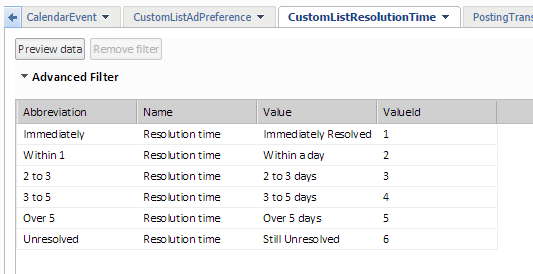
- Tip for Preparing Account and Level Data
- Even though Account and Level data varies from one customer to another, here are a couple of examples to show how a data designer can create SQL columns in the staging area to prepare data before loading into Planning.
- Account:
- CASE WHEN "acct.Number" is null THEN TRIM("acct.Name") ELSE TRIM("acct.Number") END
- Level:
- CASE WHEN "Department.Name" is null THEN 'No Department' ELSE TRIM("Department.Name") END || ' ' || "Location.Name"
- Tip for Using Business Rules
- The data designer allows you to create business rules for easy loading. Here are some tips for handling rules relating to account information:
- Account codes must be numerical values so that it's easy to add the range of GL accounts to be reversed.
- Avoid using underscores for these type of accounts. If you use an underscore, you have to manually add all account codes that you need to change the signs for.
- Account codes cannot have embedded spaces.
- Timezone Configuration
- The Account Time Zone for the NetSuite data source in Integration must match the timezone found in NetSuite's GUI underPreferences > Localization Time Zone.If the two do not match, do one of the following:
- Change the Account Time Zone within Integration so they match.
- Change the timezone setting within NetSuite for the user associated with the data source so they match.
- External References
- The core resource for the NetSuite API is the online help system at the NetSuite website, http://www.netsuite.com. NetSuite generates a PDF of this online help with each release of their product. A recent copy can be found by searching for "SuiteTalk (Web Services) Records Guide.NetSuite information can be found at https://www.oracle.com/technical-resources/. If you register for an account you can apply for access to the NetSuite subject areas.