
Referentie: legenda celkleuren en notaties
Voor een inhoudsopgave met koppelingen naar alle
Excel Interface for Planning
artikelen: ga naar Gebruik Excel Interface for Planning
. Voor informatie over celkleuren en notaties op webbladen gaat u naar Bladen gebruiken. Dit is iets anders.Cellen en de gegevens in cellen hebben verschillende achtergrond- en tekstkleuren, lettertypestijlen en driehoeksnotaties. Hiermee krijgt u snel overzichtelijke informatie over de gegevens.
Wat u ziet | Wat het betekent |
|---|---|
 White background with any text color | Change data if there is text of any color or if it is blank. |
 Gray background with any text color | Locked. The color or style of the text may indicate why. |
 Blue background with any text color | Totalisaties (totalen) voor rekeningen, tijd, aangepaste dimensies en splitsingen. U kunt deze cellen niet bewerken in: Excel Interface for Planning , maar u kunt de cellen bewerken die naar deze cel worden getotaliseerd. |
 Blue text with white or blue background | Unsaved data. |
 Green text with any background color | Actuals data. The background color tells you more about the data. |
 Bold text with any background color | Totals. |
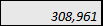 Cursieve tekst met achtergrondkleur | Has a formula. The background tells you if you can change or replace the formula. |
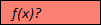 Rode achtergrond met f(x)? voor tekst. | Has a formula error. Or is missing data in the cells of a required column in modeled sheets. Adaptive Planning instance online en klik op Bladen in het navigatiemenu. |
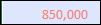 Rode tekst met een achtergrondkleur. | The formula, although correct, is referencing a cell with an error. Adaptive Planning instance online en klik op Bladen in het navigatiemenu. |
 Red triangle in the corner of cell with any color text or background | Has a note. |