
참조: 셀 색상 및 표기법 범례
모든 항목에 대한 링크가 포함된 목차
Excel Interface for Planning
문서의 경우 사용으로 이동 Excel Interface for Planning
. 웹 시트의 셀 색상 및 표기법에 대한 자세한 내용은 약간 다른 시트 사용을 참조하십시오.셀과 셀의 데이터는 배경 색상 및 텍스트 색상, 글꼴 스타일 및 삼각형 표기법이 다릅니다. 이 문서에서는 데이터에 대한 간단한 요약 정보를 제공합니다.
표시되는 내용 | 의미 |
|---|---|
 White background with any text color | Change data if there is text of any color or if it is blank. |
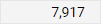 Gray background with any text color | Locked. The color or style of the text may indicate why. |
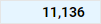 Blue background with any text color | 계정, 시간, 커스텀 디멘션 및 분할에 대한 롤업(합계) 에서 다음 셀을 편집할 수 없습니다. Excel Interface for Planning , 하지만 이 셀로 롤업되는 셀을 편집할 수 있습니다. |
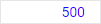 Blue text with white or blue background | Unsaved data. |
 Green text with any background color | Actuals data. The background color tells you more about the data. |
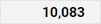 Bold text with any background color | Totals. |
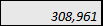 임의 배경 색상의 기울임꼴 텍스트 | Has a formula. The background tells you if you can change or replace the formula. |
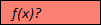 빨간색 배경에 f(x) 표시? - 텍스트의 경우 | Has a formula error. Or is missing data in the cells of a required column in modeled sheets. Adaptive Planning 인스턴스를 온라인으로 전환하고 탐색 메뉴에서 시트를 클릭합니다. |
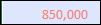 빨간색 텍스트와 임의 색상의 배경 | The formula, although correct, is referencing a cell with an error. Adaptive Planning 인스턴스를 온라인으로 전환하고 탐색 메뉴에서 시트를 클릭합니다. |
 Red triangle in the corner of cell with any color text or background | Has a note. |