
개념: 시트 유형
시트 툴바, 행, 열의 콘텐츠로 시트 유형을 식별할 수 있습니다.
시트의 유형은 3가지이며, 각각의 기능은 서로 다릅니다.
- 표준
- 모델링
- 큐브
시트를 사용하면 실제 원장 데이터, 예측 및 예산을 포함한 데이터를 조회, 입력 및 업데이트할 수 있습니다.
표준 시트
표준 시트에는 계정 및 기간으로 구성된 단순 그리드가 포함됩니다.
예를 들어 다음과 같습니다.
- 재무상태표
- 현금흐름 시트
- 경비 시트
- 손익계산서 시트
- 수익 시트
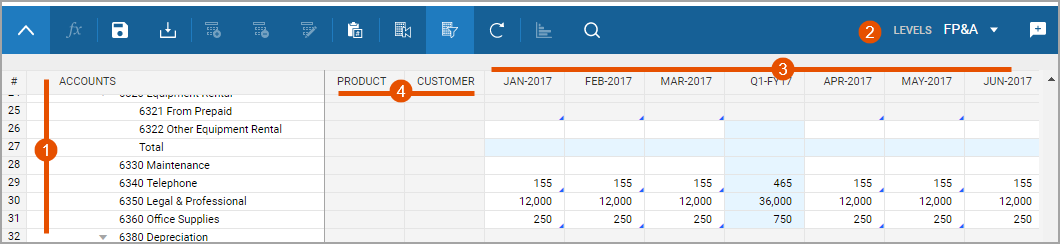
Option | Description |
|---|---|
1 | Accounts or levels populate down the rows. |
2 | Levels or accounts exist in the drop-down menu. Swap the rows with the drop-down menu. |
3 | Time populates across the columns. Change the time periods with Display Options . |
4 | Dimensions exist as columns with cells that have drop-down values. Not all standard sheets have dimensions. In order to select dimension, add a split. |
Standard sheets also have the
Add Split
, Delete Split
, and Rename Split
buttons in the toolbar. 모델링 시트
모델링 시트를 사용하여 레코드 기반 데이터를 입력할 수 있습니다. 이 시트의 경우 열에 커스터마이즈된 필드명이 표시되고 레코드는 행으로 표시됩니다. 모델링 시트에는 재무 이벤트를 모델링하기 위한 기본 비즈니스 로직이 포함되어 있습니다. 예를 들어 다음과 같습니다.
- 자산 구매에 대한 감가상각
- 직원의 월 급여
- 영업에서 발생한 수익

Option | Description |
|---|---|
1 | Add Row and Delete Row buttons display in addition to, or instead of, the add, delete, rename splits buttons. |
2 | Labeled columns exist across the top and records list down the rows. The column types determine how you enter data. You can type in fields, or select from drop-downs. There are no row headers, only column headers. |
You can enter new information into existing rows or add new rows. Your admin can set a maximum number of rows a modeled sheet can display at once. If the sheet has a maximum, a message states how many rows of the total you can see. Use the filters to uncover different sets of data.
큐브 시트
큐브 시트에서는
잠재적으로 커질 수 있는 디멘션 세트에 걸쳐 몇몇 계정에서 멀티디멘션 데이터 입력이 가능합니다.
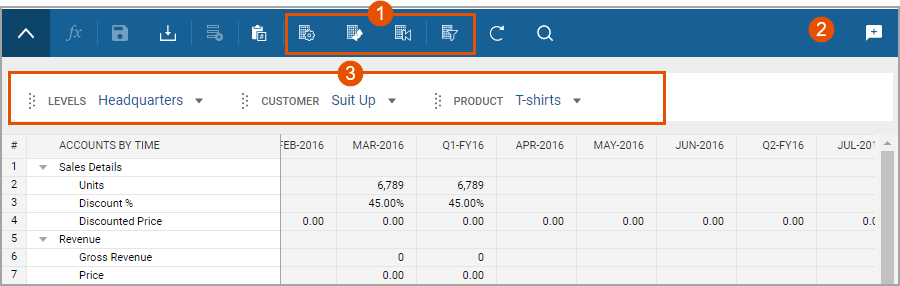
Option | Description |
|---|---|
1 | More display options exist in the toolbar. You can pivot the sheet to view data in multiple ways. |
2 | No level drop-down list exists in the toolbar. Levels are a dimension to use as filters, columns, or rows. |
3 | Alternative dimensions enable you to filter data, drag and drop into the columns and rows, and nest up to 5 dimensions in the rows. |
Merged cube sheets are entirely read-only. These sheets combine the data presence of other sheets to display calculated data.
Although the use case for cube sheets is modeling complex, multidimensional sales forecasting, you can use them for planning almost any multidimensional model.