
Reference: Formula Functions
Formula functions are grouped into four categories: mathematical, logical, string and date. Each function and a brief explanation are defined in this topic.
For simplicity, the descriptions in the table show formulas using comma separators. Some browser settings require you to use semicolon separators. The syntax columns shows both versions.
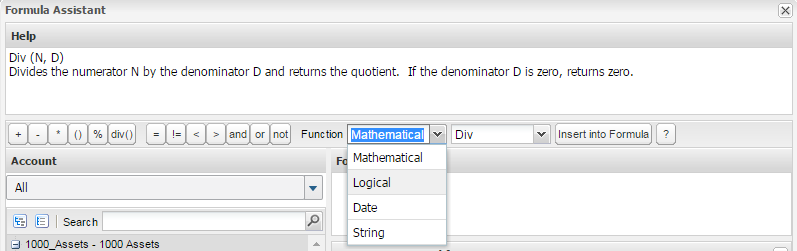
Mathematical Functions
Mathematical functions are available as buttons. For example plus (=), minus (-), and multiply (*). Additional selections are available from Function > Mathematical
.
Logical Functions
To include as part of an If
statement, basic logic functions and comparisons are available as buttons. For example, logical and (AND
), logical or (OR
), and logical negation (NOT
). Comparisons include equal to (=
), greater than (>
), less than (<
), or not equal to (!=
). You can also use (<>
) for not equal.
Additional selections are available from
Function > Logical
:Syntax | Description |
|---|---|
Blank() | Returns the Blank value. This value displays as blank (rather than a zero), but evaluates identically to zero for formula purposes. Unlike a zero, it causes theIsBlank() function to return TRUE , but similar to a zero it is able to be suppressed when "suppress empty rows" is enabled on sheets or reports. |
Error () | Causes a run-time evaluation error.
Example: IF(ACCT.EffectiveHeadcount < 0, Error(), ACCT.EffectiveHeadcount+ACCT.AddlHeadcount) If the effective headcount is less than 0, return an error to help track down the underlying problem. |
If (EXPR, T, F)
If (EXPR; T; F) | Returns a numeric value ( T ) if Boolean expression (EXPR ) is true, otherwise returns a numeric value (F ). You can use Boolean and comparison operators to construct the Boolean expression. |
Iff (EXPR, T, F)
Iff (EXPR; T; F) | The "fast" or short-circuiting form of the If function. Returns the same value asIf . However, if the condition is true, the third argument to the function is not evaluated. Similarly, if the condition is false, the second argument is not evaluated. This means that either the second or third argument could potentially contain errors but the results ofIff will still be valid because the argument that includes the error is not evaluated.
Examples:
|
IsBlank (N) | Returns true if the argument is blank or empty, false otherwise. Can only be used in an expression argument ( EXPR ) to theIf function. Example: If(IsBlank(Row.StartDate),0,1) |
Switch (Orig_EXPR, Case1, Case2, ..., Default)
Switch (Orig_EXPR; Case1; Case2; ...; Default) | Provides a method for writing compact expressions that can be used instead of complex, nested If statements.
Examples:
|
Date and Time Functions
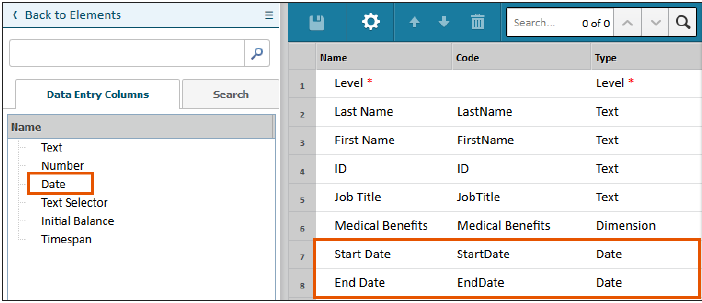
Date functions are often used in combination with modeled sheet Date
columns. Date functions only display in modeled sheet calculated accounts.
The date functions apply to calendars with Month > Quarter > Year configurations. If you have a calendar that uses a different structure, many of these functions return errors. Consider using this function instead: this.version.positionOf(D.strata). Replace D with a calendar date in this format: yyyy,mm,dd and replace strata with the strata that you use in your calendar. Example: this.version.positionOf(2024,01,02.week) returns the first week of 2024.
Syntax | Description |
|---|---|
D.Month.NumberOfDays | Returns the number of days in the month in which date D occurs. |
D.Year.PositionOf(D.Month). | Returns the month of the fiscal year in which date D occurs. |
D.Year.PositionOf(D.Qtr) | Returns the quarter of the fiscal year in which date D occurs. |
(Date). stratum_code | Returns the Timeperiod of the requested strata type which contains the (single, Gregorian) Date. Any date can be used as the base of the stratum code. Example: ToDate (2016,8,5).Qtr |
Day (D) | Returns the day of the month for date ( D ). |
DaysInMonth (D) | Returns the number of days in a month in which date D occurs. May return an error or an incorrect value for custom calendars. Use D.Month.NumberOfDays instead. |
FiscalMonth (D) | Returns the month of the fiscal year in which date ( D ) occurs. May return an error for custom calendars. UseD.Year.PositionOf(D.Month). |
FiscalQuarter (D) | Returns the quarter of the fiscal year in which date ( D ) occurs. May return an error for custom calendars. Use D.Year.PositionOf(D.Qtr). |
FiscalYear (D) | Returns the fiscal year in which date ( D ) occurs. May return an error for custom calendars. Try coding your years with numbers that exactly match the year and useToNumber (D.Year.code). |
Month (D) | Returns the month in which date ( D ) occurs. |
Quarter (D) | Returns the calendar quarter in which date ( D ) occurs. This may not be the same as your company's fiscal quarter (see below). |
this.Version.PositionOf(D.Month) | Returns a number that represents the month of the version in which the date D occurs (first month = 0 ). This number can be negative if the date D is earlier than the start of the version. |
this.Version.PositionOf(D.Year) | Returns a number that represents the year of the version in which the date D occurs (first year = 0 ). This number can be negative if the date D is earlier than the start of the version. |
TimeFraction (D1, D2, D, Dx)
TimeFraction (D1; D2; D; Dx) | Returns the portion of the current month which occurs between the start date ( D1 ) and the end date (D2 ). If an optional date (D ) is specified, uses the month in which D occurs, instead of the current month. If the optional fixed number of days parameter (Dx ) is specified, override the time period in D with the numeric value.
Instances configured without a custom calendar can use MonthFraction instead ofTimeFraction . |
ToDate (Y, M, D)
ToDate (Y; M; D) | Returns the date specified by the given year ( Y ), month (M ), and day (D ). If D is omitted, 15 is used. The value returned may be used as an argument in other functions which take a date. |
VersionMonth (D) | Returns a number that represents the month of the version in which the date ( D ) occurs (first month = 0 ). This number can be negative if the date (D ) is earlier than the start of the version.
May return an error for custom calendars. Use this.Version.PositionOf(D.Month). |
Version.PositionOf (timeperiod) | Returns the relative order of the provided time period within the entire span of the version. The first time period in a version starts with 1 and the order number can be negative if the time period occurs before the start of the version. This function also works with a time period that is beyond the end of the version. |
VersionYear (D) | Returns a number that represents the year of the version in which the date ( D ) occurs (first year = 0 ). This number can be negative if the date (D ) is earlier than the start of the version.
May return an error for custom calendars. Use this.Version.PositionOf(D.Year) . |
Year (D) | Returns the year in which date ( D ) occurs regardless of whether a custom calendar is used or not. |
String Functions
Syntax | Description |
|---|---|
Concat (text1, text2, ...)
Concat (text1; text2; ...) | Returns a concatenated string by joining two or more text strings. Example: Concat ("hello", "world") returns "helloworld" . |
Length (text) | Returns the number of characters in a text string. Example: Length ("Now, is the winter of our discontent. Made glorious summer by this son or York.") returns79 . |
Search (source_text, search_text)
Search (source_text; search_text) | Returns the starting position of search_text in source_text . Returns 0 ifsearch_text is not found. Search is not case-sensitive. Examples: Search ("Now is the winter of our discontent.", "Winter") returns 12 .Search ("Now is the winter of our discontent.", "Summer") returns 0. |
Substring (source_text, start_position, length)
Substring (source_text; start_position; length) | Returns a text string containing the characters found in source_text starting atstart_position (where position 1 is the first character of the text string) and running forlength (or up to the end of the text string, whichever is encountered first).
Selecting a start_position of 0 or less is treated as though it were position 1 . Selecting a length of 0 or less is treated as a length of 0 and returns an empty string. Selecting astart_position which is after the end ofsource_text returns an empty string. |
ToNumber (text) | Converts a text string representing a number to its numeric value. Will convert the leading part of the string until a non-numeric character is found. If the first character is non-numeric, results in an error. Examples: ToNumber ("7") returns 7 .ToNumber ("2017-12-31") returns 2017 (a number).ToNumber ("Sample") returns an error. |
Examples
The following is a Headcount formula from a Personnel modeled sheet. It is a good example of how functions can be combined. This formula returns a binary result: 1
or 0
.
If(this.Version.PositionOf(this.Month) >= this.Version.PositionOf(ROW.StartDate.Month) # if this month is after the person's start date and (isblank(ROW.EndDate) # and either they have no termination date or this.Version.PositionOf(this.Month) <= Version.PositionOf(ROW.EndDate.Month)), # or the current month is before termination date 1, # return 1 for their headcount in this month 0) # otherwise, return 0