Display Column is Incorrectly Returning Zero in the Column
Display Column is Incorrectly Returning Zero in the Column
This article includes suggestions and workarounds. Content may not be accurate for all use cases or represent best practices for the latest release.
Question
Why is the Monthly Salary column
on my Personnel sheet returning zero?
Answer
This column is likely a Display
Column. A Display Column on a modeled sheet shows how a specific calculated account is
evaluating for that row given certain time restrictions. For example, the column might
be set to show the value from the first non-Actuals month in the version or show 12
months summed together, starting at the fiscal year prior to the Start of plan for the
version.
One quick way to verify if the reason the zero is returning is just a
display setting, or if the calculation for that account is actually evaluating to
zero when it should be returning data, is to right-click on the row on the modeled
sheet and select Row Details. Row Details will show you, for that particular row,
how every calculated account on the sheet is evaluating. There should be a line in
this window representing the column that is displayed on the sheet.
If this
account is evaluating correctly in Row Details, but shows a zero in the column, this
is likely due to the columns settings. From Modeling > Level Assigned Sheets (or
User Assigned Sheets) > Edit next to the modeled sheet > Columns and Levels.
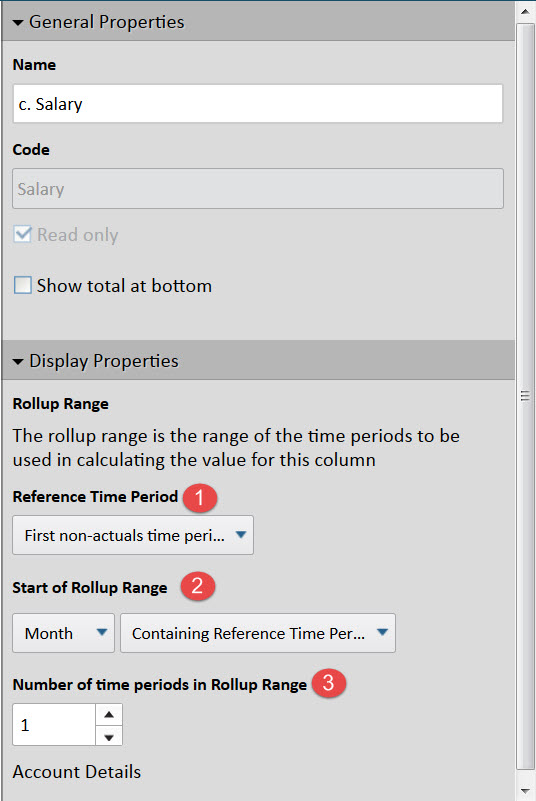
There are three relevant settings to the column to determine what month(s) of values
will display:
Reference Month: First non-Actuals month or Start of plan
Start of Rollup Range: Where are we starting our display of data relative to
the reference month
Number of Months in Rollup Range: Starting at the month from the above two
settings, how many subsequent months are we summing together