Calculated Account Formula Syntax for Modeled Sheets
This article includes suggestions and workarounds. Content may not be accurate for all use cases or represent best practices for the latest release.
Question
I have a modeled sheet that
contains a date column and three numeric columns (Labor, Parts, and Planning). I want
the system to sum the three numeric columns and expense the value in the appropriate
month based on the date element. In the example below, I want February 2013 to display a
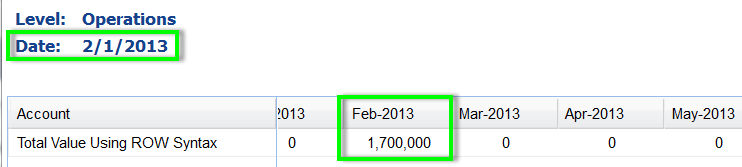
value of 1.7 million. How would I accomplish this?Answer
You should create the logic in a
Calculated account and then display the account on a report or a Standard sheet. Here is
an example of the formula logic to have the data populated in the month specified:if(versionmonth(this)=versionmonth(ROW.Date), (ROW.
Labor+ROW.Parts+ROW.Planning),0)
It is important that
ROW.
syntax is used rather than ACCT.
syntax.
This is because ACCT. syntax pulls the entire value of the account for the level
into the calculation for each row on the sheet on that level. Using ROW. syntax
gives you the data for the row only.If we then view the sheet and right-click
on the row and choose Row Details, we can see that the value 1,700,000 is displayed
in February 2013.