
Link Modeled Sheets When Their Organizational Structures Don't Match
In many companies, the sales organization operates with an organizational structure that is different from how the finance team manages that structure. As an example, finance might have dozens of levels it uses as cost centers, with only one for sales. The sales team could have its own level structure that does not overlap with finance's cost center. When the finance instance and sales planning instance get created, they can reflect this difference.
You can link modeled sheets when organizational structures don't match by placing dimension columns in both the sheet you link to (the sending sheet), and the sheet you link from (the receiving sheet). The dimensions in these columns need to mimic the level structure of the linked sheets.
The process below shows the receiving sheet on the left, and the sending sheet on the right:
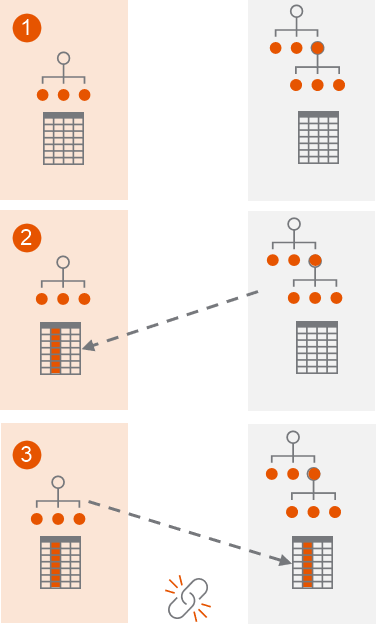
1 | Identify the receiving and sending sheet's organizational structure. The sheets you identify do not need to have identical names. |
2 | Create a dimension in the receiving sheet that mimics the sending sheet's organizational structure. Add it as a column in the receiving sheet. |
3 | Create a dimension in the sending sheet that mimics the receiving sheet's organizational structure. Add it as a column in the sending sheet, then link the receiving sheet to the sending sheet. |
Prerequisites
Prerequisites
- Security: Model Management Access, Model, and Admin Access
- Understand how to create modeled sheet links. Make sure that your instances have a linked level, and that you have access to the levels you need to link.
- Generate a printable view of the levels (organizational structure) on both instances as a reference.
- Identify your receiving modeled sheet and your sending modeled sheet.
Mimic Levels of the Sending Sheet
In the receiving modeled sheet, mimic the levels of the sending sheet using a dimension such as Sales Region. Use any dimension name you like.
These steps take place in the receiving sheet's instance, named Finance. The sending sheet's instance is Sales.
- Look at the instance drop-down. Verify that you are in the receiving sheet's instance containing the modeled sheet you want to link from.
- From nav menu, go toModeling > Model Managementand selectDimensions.
- Create a dimension in the receiving instance that mimics the levels of the sending sheet instance. As an example, if you link into your sending Sales instance, name the dimension Sales Region and give it child dimension values of WW, EU, NA, East, Central, West, and APAC to mimic the Sales levels.
- From the breadcrumbs, clickModel Management > Level Assigned Sheetsand select the sheet name for the sheet you want to link from.
- ClickColumns and Levelsin the Modeled Sheet Overview.
- Add the dimension you just created as a column.
Mimic Levels of the Receiving Sheet
In the sending modeled sheet, mimic the levels of the receiving sheet using a dimension. Use any dimension name you like.
These steps take place in the sending sheet's instance, named Sales. The receiving sheet's instance is Finance.
- Use the instance drop-down prompt to go to the instance of the modeled sheet you want to link to.
- From the nav menu, clickModelingand selectDimensions.
- Create a dimension in the sending sheet instance that mimics the receiving sheet instance's level structure. As an example, you could name the dimension Departments and give it child dimension values of Sales, Engineering, and Marketing.
- From the breadcrumbs, clickModel Management > Level Assigned Sheetsand select the sheet name of the sheet your sales instance needs to link to.
- ClickColumns and Levelsin the Modeled Sheet Overview.
- Add the dimension you just created as a column.
- Rename the Levels column in this model sheet to match the dimension name you created in your sales instance. As an example, rename it Sales Region.
- SelectSave.
- Navigate to the sheet and make sure that none of the dimension values in the column you just created are blank.
- Create the link between these receiving and sending sheets.