
Concept: Day(this) Formulas and Custom Calendars
With the introduction of flexible time modeling in Release 2017.2, the use of
day(this)
within formulas gets interpreted differently depending on if your instance has
a legacy calendar or a custom calendar. Legacy calendars are calendars created before
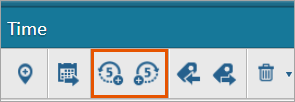
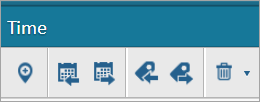
Release 2017.2 that have not been changed within the Time Administration area. See Steps: Change Calendars.The easiest way to determine if your calendar is legacy is to view the Time Administration's toolbar. Only legacy calendars have the extend backward and forward buttons.
Legacy Calendar Time Administration Toolbar | Custom Calendar Time Administration Toolbar |
|---|---|
| 
|
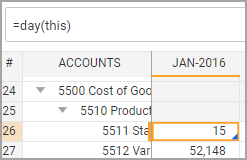
Legacy calendars interpret the
day(this)
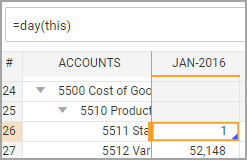
function as the number 15.If you change your legacy calendar by lengthening it, changing its labels, or adding or removing time strata, it becomes a custom calendar. Any instances created after Release 2017.2 automatically operate as custom calendars by default, even though they're monthly. While legacy calendars always return the number 15 for
day(this),
custom calendars interpretday(this)
as the day integer of the first date of the containing time period.day(this) in a Legacy Calendar | day(this) in a Custom Calendar |
|---|---|
| 
|
return value for January 2016 = 15 | return value for January 2016 = 1 |
For example, in a custom calendar configured with weeks, if week 1 of a year begins January 1, using
day(this)
in week 2 returns the number 8. January 8 is the first day of week 2.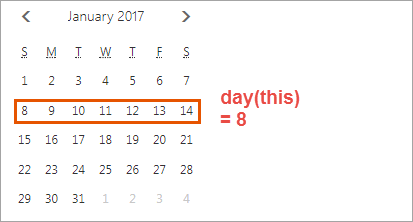
How
(this) is
Interpreted in a Comparison Within an IF statement
For
legacy calendars, the word ((this)
is
Interpreted in a Comparison Within an IF
statement this
) within a formula can represent the
15th of any month when it is used as a comparison in an IF
statement.In a custom calendar
(this)
represents the start date
of a time period.For example, the formula
IF(this>toDate(2016,1,1),1,0)
will return a 1 in a legacy
calendar that starts in January 2016. In a custom calendar, the formula returns a 1
starting in February 2016.In January 2016 of a legacy calendar,
(
this)
means 1-15-2016, and in a custom calendar
(this)
means 1-1-2016.IF(this>toDate(2016,1,1),1,0) | January 2016 | February 2016 |
|---|---|---|
Legacy | result = 1 | result=1 |
Custom | result=0 | result=0 |
How to Edit day
(this)
Formulas from Legacy Calendars for Use in New Calendars
There are
two steps to take to ensure your formulas produce expected results when you use them in
custom calendars or instances created after Release 2017.2. day
(this)
Formulas from Legacy Calendars for Use in New Calendars- Within all formulas, replace all instances ofday(this)in a legacy calendar with the number 15.
- Within anIFstatement in a legacy calendar replace the word(this)withtoDate(this.year,this.month,15).