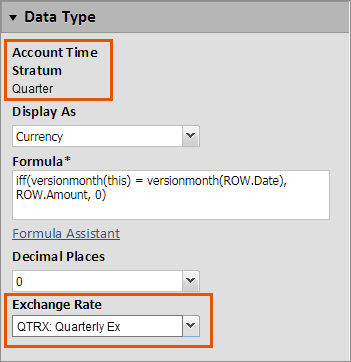
Create a Quarterly Exchange Rate Type for Quarterly Accounts
Exchange rates are always entered at the GL accounts' time strata. For most organizations this
means the rates are entered by month. Model dependent time lets you create accounts that
use quarter as their default time strata (quarterly accounts) when your GL accounts are
set to month. Having accounts at these different time settings may not produce the
currency exchange rate results you expect.
The article explains how you can create a quarterly exchange rate type to select in all of your quarterly accounts so you get the currency exchange rate results you expect.
Navigation
 From the nav menu, select
 Modeling
. From the Others
menu, select Currencies
.Create Quarterly Exchange Rate
- UnderExchange Rate TypesselectAdd New.
- Create anExchange Rate Typewith a code, abbreviation and name that clearly indicates it is for accounts other than your general ledger accounts.
- Provide a description that explains the use.
- Save.
- SelectEnter Currency Exchange Rates.
- Within Exchange Rates sheet, enter the quarterly value in the last month of each quarter.
- Save.
- When creating an account, select theExchange Ratetype you created in step 3 that matches the time strata of this account.