
Enter Ownership Percentages
Audience: Admins who manage models with consolidation.
In the Consolidation Percentages sheet, define the percent of ownership a level has over
another. The sheet has all the levels in your model listed down the rows. In the sheet's
settings, specify the percent of ownership that triggers each consolidation method.
Prerequisites
Prerequisites
- Your model must have the consolidation capability. Contact us for more information.
- New to consolidation? See Concept: Consolidation and Concept: Consolidation Ownership.
- Security:ModelandConsolidationpermissions.
- Organize your levels so that subsidiaries roll up to parent companies.
Navigation
From the nav menu, click
Modeling
. Then, from the Others
menu, click
Consolidation Percentages
to open the sheet.Enter Percentages in Basic
Hierarchy
For each of the child levels, enter the percent that is owned by
the immediate parent level. Enter 100% or leave the cells blank for any level that's
owned 100% by its parent. For example, Total Company owns 55% of Company B. Enter 55%
in the cells of Company B's row.

Enter Percentages in Complex
Hierarchies
When a subsidiary row is read-only, like both Company A and C in
the preceding image, it has child levels. These levels could be subsidiaries or internal
departments.To enter Total Company's ownership of Company A and C, enter the
percentages in the (Only) rows.
- Click the plus sign next to levels to expand until you cannot expand anymore.
- Find the (Only) rows of the parent levels. Every level that has child levels has an (Only) row.
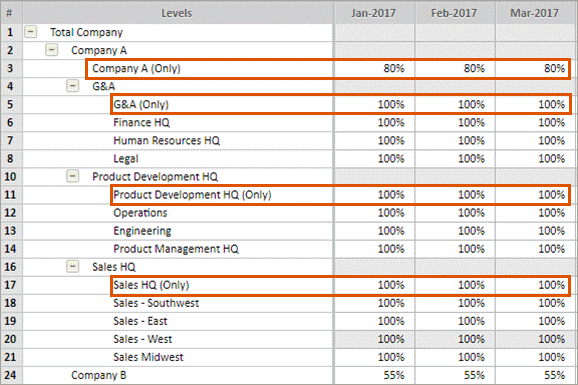
- Enter the percent in the (Only) row. For example, if Total Company owns 80% of Company A, enter 80% in the cells of the Company A (Only) row.
- Save the sheet.
Initial Balance Column
The sheet
includes a column for initial balances in your instance.- Clickthe gear icon from the toolbar to view the triggers for each method.
- Enter percentages in the Initial Balance column:
- If you don't want the initial balances to roll up, enter a percent that triggers No Consolidation.
- If you want the initial balance to roll up in proportion to ownership, enter a percent within the range for Proportional.
- If you want the entire balance to roll up, enter a percent that triggers Full Consolidation.
- Save the sheet.
Time and Level Rollups
Rollup
cells, any blue cell on the sheet, represent totals or averages of time and levels. The
rollup cells on the Consolidation Percentages sheet are different.- Level Rollups
- The values you enter in the sheet don't rollup to the parent levels. For example, you can enter 100% in each child level of Company A. Then enter 80% in the Company A (Only) row. When you collapse Company A, you'll see 80%, not a rollup value.
- Time Rollups
- Time rollups, such as quarters or years, display the same value as the last contributing row. Time rollups in this sheet don't add valuable information.To hide the time rollups, clickDisplay Optionsfrom the toolbar. From the Column Display Options, uncheck all the time periods except the smallest. This is generally months for most models, depending on your model's calendar.