
Swap from Oracle JDK to OpenJDK for Data Agents
- Verify you have local rights on your computer to install OpenJDK.
- Make a note of your Data Agent Service Manager version..
You can swap from the Oracle JDK to an OpenJDK (Azul Zulu JDK) without uninstalling your data agent. Swapping from Oracle can help you avoid the licensing fees associated with using the Oracle JDK. Before 2024R1, by default, the Data Agent installer installed the Oracle JRE if it didn't detect a valid JDK on your system.
We strongly recommend the Azul Zulu OpenJDK Azul Zulu OpenJDK Download.
These steps take place on your local computer.
- Stop theAdaptive Agent Servicein the Windows Services Manager.
- Close theData Agent Service Managerand theAdaptive Script Editor.
- Uninstall the Oracle JRE/JDK and restart your computer.
- Download and install an OpenJDK (.msi or .exe).
- Make sure you select these OpenJDK installation options in Custom Setup in the installation wizard:
- JAVA_HOME
- JAR Files Association
- Registry
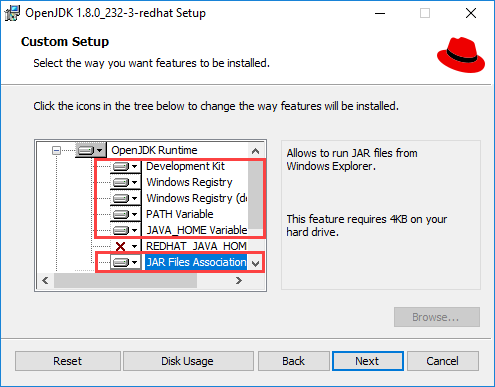
- Complete the installation.
- Restart your computer.
- Open the Workday Adaptive Planning Data Agent Manager and verify your existing data agents started.